Francis Burnet – AI Engineering Portfolio

Capstone portfolio spanning AI engineering, applied data science, machine learning, and deep learning.

Francis Burnet headshot

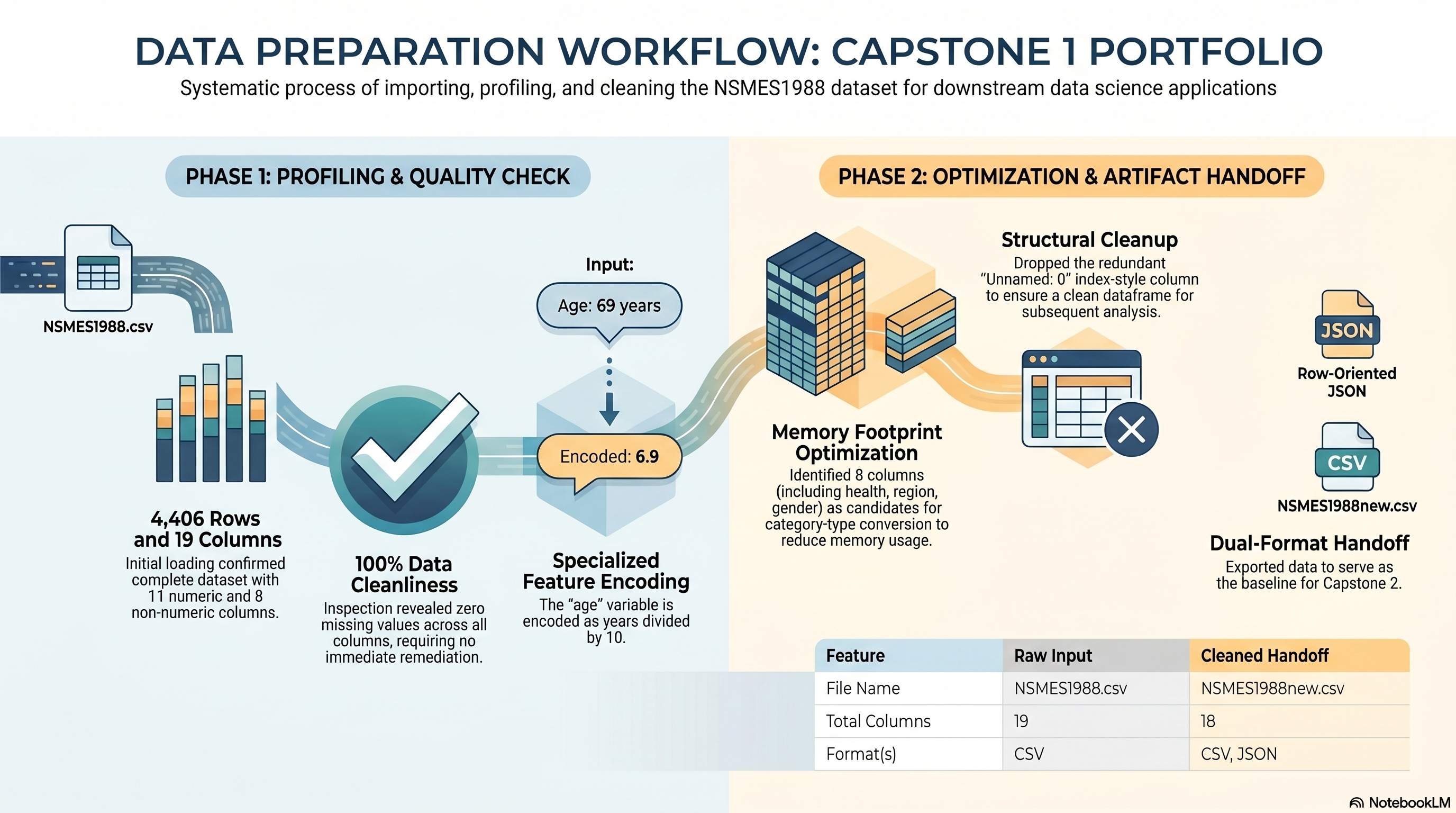
Capstone 1 Evidence Map

Capstone 1 infographic
Capstone Summary

The provided text outlines the Microsoft AI Engineering Program 2026, specifically focusing on the initial Capstone 1 project within the Applied Data Science track. This phase of the portfolio documents the essential workflow for data preparation, starting with the ingestion of the NSMES1988 dataset and moving through rigorous cleaning and inspection protocols. The project emphasizes technical milestones such as memory optimization, identifying data distributions for columns like age and income, and removing redundant index features. Results are formalized through the creation of structured exports in both JSON and CSV formats to facilitate subsequent analysis stages. Finally, the documentation includes visual reports and interactive notebooks to verify that all requirements for high-quality data engineering have been met.

Applied Data Science

Capstone 1: Data Import and Cleaning

Capstone 1 covers data import, inspection, data quality review, JSON export, memory review, and cleaned CSV export.

Mapped source folder: Incremental Capstones/Applied Data Science with Python/Capstone 1

Quick Facts
  • Dataset: NSMES1988.csv
  • Notebook workflow: 1a through 1j in PDF order
  • Primary exports: NSMES1988.json, NSMES1988new.csv
  • Current execution mode: artifact-backed presentation with no live rerun yet

Original Project PDF

The original Capstone 1 directions are embedded here.

Requirement Checklist

The checklist below follows the PDF task bullets from pages 15 and 16.

1a

Import relevant Python libraries necessary for Python programming and Numpy for numerical operations.

Source mapping: PDF p.15 / Notebook 1a

Evidence note: The rebuilt notebook imports `io`, `json`, `numpy`, `pandas`, `matplotlib.pyplot`, and `display` before the data steps begin.

1b

Import the CSV file `NSMES1988.csv` into a dataframe.

Source mapping: Notebook C?-T2

Evidence note: Notebook loads `NSMES1988.csv` with `pd.read_csv(...)` and previews the dataframe.

1c

Inspect the dataset and report rows, columns, and data types.

Source mapping: Notebook C1-T4

Evidence note: Notebook reports shape, columns, `info()`, descriptive statistics, and a head preview.

1d

Find out if the data is clean or if the data has missing values.

Source mapping: Notebook C1-T5

Evidence note: Notebook computes missing-value counts and percentages for every column.

1e

Comment on the data types, their values and range, specifically on `age` and `income` columns.

Source mapping: Notebook C1-T6

Evidence note: Notebook documents dtype, range, and age encoding notes for `age` and `income`.

1f

Export the data to JSON as `NSMES1988.json` and view and enter your comments.

Source mapping: Notebook C1-T7

Evidence note: Notebook exports JSON and previews a snippet for format comments.

1g

Perform memory information on the data and recommend what non-default data types would optimize dataframe memory settings.

Source mapping: Notebook C1-T8

Evidence note: Notebook measures memory usage and recommends category conversion candidates.

1h

Recommend what changes should be made on the dataframe before attempting a detailed data analysis.

Source mapping: Notebook C1-T9

Evidence note: Notebook recommends dropping the index-like `Unnamed: 0` column before downstream analysis.

1i

Export the dataframe as a new CSV file `NSMES1988new.csv` and store it locally for other assignments.

Source mapping: Notebook C1-T9

Evidence note: Notebook exports the cleaned dataframe to `outputs/NSMES1988new.csv`.

1j

Write a short report on the visual observations of the data.

Source mapping: Notebook 1j / PDF p.16

Evidence note: The rebuilt notebook now generates a two-panel visual summary, saves `capstone_1_visual_observations.png`, and prints a short observations report beneath the charts.

Requirement Walkthrough

Each block below covers one requirement and the matching notebook evidence.

1a

Library Imports Required by the PDF

Notebook section: 1a

Requirement: Import relevant Python libraries necessary for Python programming and Numpy for numerical operations.

The rebuilt notebook starts with a dedicated import cell that loads the core analysis and plotting libraries used throughout the capstone workflow.

Results Capture
  • The notebook now imports `numpy` explicitly, which satisfies the PDF wording for numerical operations.
  • The import cell also loads `pandas`, `matplotlib.pyplot`, `io`, `json`, and `display` for the later steps.
  • This requirement is now backed by a dedicated notebook step instead of inferred from partial notebook fragments.
import io
import json
import numpy as np
import pandas as pd
import matplotlib.pyplot as plt
from IPython.display import display
1b

Load the Source CSV into a Dataframe

Notebook section: C?-T2

Requirement: Import the CSV file `NSMES1988.csv` into a dataframe.

The notebook loads the required CSV file and confirms the dataframe shape.

Results Capture
  • The dataset is loaded from the expected default filename: `NSMES1988.csv`.
  • The notebook confirms shape immediately after loading: `(4406, 19)`.
  • A head preview is displayed as initial evidence that the dataframe loaded successfully.
dataset_path = DATASET_PATH
df = pd.read_csv(dataset_path)

print("Loaded:", dataset_path)
print("Shape:", df.shape)
display(df.head())
1c

Inspection and Basic Profiling

Notebook section: C1-T4

Requirement: Inspect the data and report details such as rows, columns, and data types.

The notebook profiles the dataset with `shape`, `columns`, `info`, numeric `describe()`, and a head preview before any transformation.

Results Capture
  • `df.shape = (4406, 19)`.
  • 11 numeric columns and 8 non-numeric columns were identified.
  • `Unnamed: 0` is visible during inspection and is later treated as index-like cleanup work.
# Inspection
print("Shape:", df.shape)
print("\nColumns:")
print(df.columns.tolist())

print("\nInfo:")
df.info()

print("\nDescribe (numeric):")
display(df.describe())

print("\nHead:")
display(df.head())
1d

Missing Values and Cleanliness Check

Notebook section: C1-T5

Requirement: Find out if the data is clean or if the data has missing values.

Missing-value counts and percentages were computed for every field to verify whether any treatment was required before export.

Results Capture
  • All copied columns returned `0` missing values.
  • No missing-value treatment was required before continuing to export tasks.
  • The cleanliness check is now mapped directly to the PDF bullet instead of being inferred from the workflow prompt.
# Missing values
na_counts = df.isna().sum().sort_values(ascending=False)
na_pct = (df.isna().mean() * 100).round(2)
missing_summary = pd.DataFrame({"missing_count": na_counts, "missing_pct": na_pct})
display(missing_summary[missing_summary["missing_count"] > 0] if (missing_summary["missing_count"] > 0).any() else missing_summary.head())
1e

Age and Income Interpretation

Notebook section: C1-T6

Requirement: Comment on the data types, their values and range, specifically on `age` and `income` columns.

The page preserves the notebook interpretation that age is stored as years divided by 10 and verifies the ranges for both `age` and `income`.

Results Capture
  • `age` uses `float64` with a range of `6.6` to `10.9`.
  • `income` uses `float64` with a range of `-1.0125` to `54.8351`.
  • Example interpretation preserved from the project notes: `age = 6.9` corresponds to 69 years.
# Age + income notes
for col in ["age", "income"]:
    if col in df.columns:
        print(f"\n{col} dtype:", df[col].dtype)
        print(df[col].describe())
    else:
        print(f"Column not found: {col}")
1f

JSON Export and Format Comment

Notebook section: C1-T7

Requirement: Export the data to JSON as `NSMES1988.json` and view and enter your comments.

The notebook exported the full dataframe using `records` orientation and previewed a snippet to confirm the row-wise object structure.

Results Capture
  • Artifact saved as `outputs/NSMES1988.json`.
  • The JSON is row-oriented and suitable for downstream systems that expect one object per record.
# Export JSON
json_path = BASE_DIR / "outputs" / "NSMES1988.json"
json_path.parent.mkdir(parents=True, exist_ok=True)

df.to_json(json_path, orient="records")
print("Saved:", json_path)

# Preview first ~500 chars
with open(json_path, "r", encoding="utf-8") as f:
    snippet = f.read(500)
print("\nJSON snippet (first 500 chars):\n", snippet)
1g

Memory Usage and Dtype Recommendations

Notebook section: C1-T8

Requirement: Perform memory information on the data and recommend what non-default data types would optimize dataframe memory settings.

The notebook measures total dataframe memory and identifies category-conversion candidates.

Results Capture
  • Total memory usage: `2,263,919` bytes (`2.159 MB`).
  • Recommended category columns: `health`, `adl`, `region`, `gender`, `married`, `employed`, `insurance`, `medicaid`.
# Memory usage
mem = df.memory_usage(deep=True).sum()
print("Total memory (bytes):", mem)
print("Total memory (MB):", round(mem / (1024**2), 3))
candidate_category = [c for c in ["health","adl","region","gender","married","employed","insurance","medicaid"] if c in df.columns]
print("Recommended category columns:", candidate_category)
1h

Recommended Dataframe Changes Before Detailed Analysis

Notebook section: C1-T9

Requirement: Recommend what changes should be made on the dataframe before attempting a detailed data analysis.

The notebook recommends removing the index-like `Unnamed: 0` column before deeper analysis.

Results Capture
  • Recommended cleanup: drop `Unnamed: 0` before detailed analysis.
  • The recommendation is separated here because the PDF states it as its own bullet before the final CSV export.
  • The same cleanup step is reused in the cleaned CSV handoff export.
df_clean = df.copy()

if "Unnamed: 0" in df_clean.columns:
    df_clean = df_clean.drop(columns=["Unnamed: 0"])
    print("Dropped column: Unnamed: 0")
1i

Cleaned CSV Handoff Export

Notebook section: C1-T9

Requirement: Export the dataframe as a new CSV file `NSMES1988new.csv` and store it locally for other assignments.

After the recommended cleanup is applied, the notebook saves the cleaned handoff file for later capstone work.

Results Capture
  • Artifact saved as `outputs/NSMES1988new.csv`.
  • Resulting shape: `(4406, 18)`.
  • The exported file is the cleaned handoff used for the next assignment stage.
out_csv = BASE_DIR / "outputs" / "NSMES1988new.csv"
out_csv.parent.mkdir(parents=True, exist_ok=True)

df_clean.to_csv(out_csv, index=False)
print("Saved:", out_csv)
print("Shape:", df_clean.shape)
1j

Short Report on Visual Observations

Notebook section: 1j

Requirement: Write a short report on the visual observations of the data.

The rebuilt notebook closes with a dedicated visual-observations step that plots the data, saves the figure, and prints a short written report from the same working dataframe.

Results Capture
  • The notebook generates a two-panel figure covering health-category counts and the income distribution.
  • The chart is saved as `outputs/capstone_1_visual_observations.png` during notebook execution.
  • A short observations report is printed immediately after the figure so the PDF requirement is satisfied in the same step.
fig, axes = plt.subplots(1, 2, figsize=(14, 5))

df['health'].value_counts(dropna=False).plot(kind='bar', ax=axes[0], color='#328cc1')
df['income'].plot(kind='hist', bins=20, ax=axes[1], color='#d9b310')

visual_report_path = OUTPUT_DIR / 'capstone_1_visual_observations.png'
fig.savefig(visual_report_path, bbox_inches='tight')

print('Saved visual observations figure to:', visual_report_path)
print('- The most common health category in the dataset is average.')
print('- The income distribution is right-skewed with fewer high-income observations.')

Charts and Plots

Charts generated by the notebook. Click any image to open full-size, or use the download button to save the file.

Colab Notebook

This section provides the notebook preview, launch link, and project file links.

Project files and outputs remain available on this page.

Capstone 1 Notebook Workspace
Launch Colab
Embedded Notebook Preview
Cell 1 Markdown

Capstone 1 Action Notebook

Source of truth: Capstone_Session_1.pdf pages 15-16.

This notebook is organized around the actionable Capstone 1 requirements extracted from the PDF. Each requirement is presented as its own step with a short description, the inputs used, and the output or evidence produced.

Preparation

This notebook stages the Capstone 1 source files from the live site before the requirement steps begin.

Inputs used in setup:

  • Capstone_Session_1.pdf
  • NSMES1988.csv
  • capstone_1.ipynb

Expected setup output:

  • a local working folder in Colab with inputs/ and outputs/ directories ready for the requirement steps
Cell 2 Code · python
from pathlib import Path
from urllib.request import urlretrieve
import os

SITE_BASE = os.environ.get('FRANCISBURNET_SITE_BASE', 'https://francisburnet.com')
BASE_DIR = Path('/content/francisburnet_capstone_1')
INPUT_DIR = BASE_DIR / 'inputs'
OUTPUT_DIR = BASE_DIR / 'outputs'
INPUT_DIR.mkdir(parents=True, exist_ok=True)
OUTPUT_DIR.mkdir(parents=True, exist_ok=True)

PDF_URL = SITE_BASE + '/artifact.php?path=Incremental+Capstones%2FApplied+Data+Science+with+Python%2FCapstone+1%2FCapstone_Session_1.pdf&download=1'
DATASET_URL = SITE_BASE + '/artifact.php?path=Incremental+Capstones%2FApplied+Data+Science+with+Python%2FCapstone+1%2FNSMES1988.csv&download=1'
NOTEBOOK_URL = SITE_BASE + '/artifact.php?path=Incremental+Capstones%2FApplied+Data+Science+with+Python%2FCapstone+1%2Fcapstone_1.ipynb&download=1'

pdf_path, _ = urlretrieve(PDF_URL, INPUT_DIR / 'Capstone_Session_1.pdf')
dataset_path, _ = urlretrieve(DATASET_URL, INPUT_DIR / 'NSMES1988.csv')
source_notebook_path, _ = urlretrieve(NOTEBOOK_URL, INPUT_DIR / 'capstone_1.ipynb')

print('SITE_BASE =', SITE_BASE)
print('PDF path =', pdf_path)
print('Dataset path =', dataset_path)
print('Source notebook path =', source_notebook_path)
print('Output directory =', OUTPUT_DIR)
Cell 3 Markdown

1a. Import Required Libraries

Requirement: Import relevant Python libraries necessary for Python programming and Numpy for numerical operations.

Purpose: load the data and plotting libraries used in the remaining Capstone 1 steps.

Inputs used: none.

Expected output: the notebook runtime has the required libraries loaded and ready to use.

Cell 4 Code · python
import io
import json
import numpy as np
import pandas as pd
import matplotlib.pyplot as plt
from IPython.display import display

print('Loaded libraries: io, json, numpy, pandas, matplotlib, display')
Cell 5 Markdown

1b. Load the Source CSV into a DataFrame

Requirement: Import the CSV file NSMES1988.csv into a dataframe.

Purpose: load the source dataset into pandas so the remaining inspection and cleaning steps can operate on the same object.

Inputs used:

  • inputs/NSMES1988.csv

Expected output: a dataframe named df containing the raw Capstone 1 dataset.

Cell 6 Code · python
df = pd.read_csv(dataset_path)

print('Loaded dataset from:', dataset_path)
print('Shape:', df.shape)
display(df.head())
Cell 7 Markdown

1c. Inspect the Dataset Structure

Requirement: Inspect the dataset and report rows, columns, and data types.

Purpose: document the shape, field list, and dtype profile before any cleaning work begins.

Inputs used:

  • dataframe df

Expected output: row count, column count, column names, data types, and a descriptive summary.

Cell 8 Code · python
info_buffer = io.StringIO()
df.info(buf=info_buffer)

print('Rows:', df.shape[0])
print('Columns:', df.shape[1])
print('Column names:', df.columns.tolist())
print('\nData types and null counts:')
print(info_buffer.getvalue())

display(df.describe(include='all').transpose())
Cell 9 Markdown

1d. Check Data Cleanliness and Missing Values

Requirement: Find out if the data is clean or if the data has missing values.

Purpose: measure null counts and null percentages before any recommendation or export step.

Inputs used:

  • dataframe df

Expected output: a missing-value summary table that shows whether any columns require remediation.

Cell 10 Code · python
missing_summary = pd.DataFrame({
    'missing_count': df.isna().sum(),
    'missing_pct': (df.isna().mean() * 100).round(2),
}).sort_values(['missing_count', 'missing_pct'], ascending=False)

print('Columns with missing values:', int((missing_summary['missing_count'] > 0).sum()))
display(missing_summary)
Cell 11 Markdown

1e. Comment on age and income

Requirement: Comment on the data types, their values and range, specifically on age and income columns.

Purpose: isolate the two columns named in the PDF and describe their type, range, and interpretation.

Inputs used:

  • dataframe df
  • columns age and income

Expected output: descriptive statistics and a short interpretation for both fields.

Cell 12 Code · python
age_summary = df['age'].describe()
income_summary = df['income'].describe()

print('age dtype:', df['age'].dtype)
print(age_summary)
print('\nincome dtype:', df['income'].dtype)
print(income_summary)
print('\nInterpretation note: the `age` values appear to be stored as age divided by 10, so 6.9 corresponds to approximately 69 years.')
Cell 13 Markdown

1f. Export the Dataset to JSON

Requirement: Export the data to JSON as NSMES1988.json and view and enter comments.

Purpose: create the JSON artifact requested by the PDF and inspect the structure of the saved file.

Inputs used:

  • dataframe df

Expected output:

  • outputs/NSMES1988.json
  • a short JSON preview for format inspection
Cell 14 Code · python
json_path = OUTPUT_DIR / 'NSMES1988.json'
df.to_json(json_path, orient='records')

print('Saved JSON artifact to:', json_path)
with open(json_path, 'r', encoding='utf-8') as handle:
    json_preview = handle.read(500)
print('\nJSON preview:\n', json_preview)
Cell 15 Markdown

1g. Measure Memory Usage and Recommend Better Data Types

Requirement: Perform memory information on the data and recommend what non-default data types would optimize dataframe memory settings.

Purpose: quantify dataframe memory usage and identify columns that are good candidates for category encoding.

Inputs used:

  • dataframe df

Expected output: total memory usage and a list of columns that can be converted to category.

Cell 16 Code · python
memory_bytes = df.memory_usage(deep=True).sum()
recommended_category_columns = [
    column for column in ['health', 'adl', 'region', 'gender', 'married', 'employed', 'insurance', 'medicaid']
    if column in df.columns
]

print('Total memory (bytes):', memory_bytes)
print('Total memory (MB):', round(memory_bytes / (1024 ** 2), 3))
print('Recommended category columns:', recommended_category_columns)

if recommended_category_columns:
    category_memory = df[recommended_category_columns].astype('category').memory_usage(deep=True).sum()
    original_memory = df[recommended_category_columns].memory_usage(deep=True).sum()
    print('Potential memory reduction on recommended columns (bytes):', original_memory - category_memory)
Cell 17 Markdown

1h. Recommend DataFrame Changes Before Detailed Analysis

Requirement: Recommend what changes should be made on the dataframe before attempting a detailed data analysis.

Purpose: record the cleanup recommendation from the Capstone 1 workflow before the cleaned export is created.

Inputs used:

  • dataframe df

Expected output: a cleaned dataframe named df_clean and a clear note describing the recommended column change.

Cell 18 Code · python
df_clean = df.copy()
cleanup_notes = []

if 'Unnamed: 0' in df_clean.columns:
    df_clean = df_clean.drop(columns=['Unnamed: 0'])
    cleanup_notes.append("Dropped the index-like 'Unnamed: 0' column before detailed analysis.")
elif '' in df_clean.columns:
    df_clean = df_clean.drop(columns=[''])
    cleanup_notes.append("Dropped the unlabeled index-like first column before detailed analysis.")
else:
    cleanup_notes.append('No index-like placeholder column was found.')

for note in cleanup_notes:
    print(note)
print('Clean dataframe shape:', df_clean.shape)
Cell 19 Markdown

1i. Export the Cleaned DataFrame to CSV

Requirement: Export the dataframe as a new CSV file NSMES1988new.csv and store it locally for other assignments.

Purpose: save the cleaned handoff dataset after the recommended cleanup has been applied.

Inputs used:

  • cleaned dataframe df_clean

Expected output:

  • outputs/NSMES1988new.csv
Cell 20 Code · python
cleaned_csv_path = OUTPUT_DIR / 'NSMES1988new.csv'
df_clean.to_csv(cleaned_csv_path, index=False)

print('Saved cleaned CSV artifact to:', cleaned_csv_path)
print('Cleaned dataframe shape:', df_clean.shape)
Cell 21 Markdown

1j. Write a Short Report on Visual Observations

Requirement: Write a short report on the visual observations of the data.

Purpose: produce a visual summary from the staged dataset and document the main observations in notebook output.

Inputs used:

  • dataframe df
  • columns health, income, and visits when available

Chart design notes:

  • the first panel shows the health category counts
  • the income histogram is limited to the 99th percentile so the main distribution is readable
  • a separate income boxplot keeps the full outlier range visible

Expected output:

  • a saved figure with a health bar chart, a focused income histogram, and an income boxplot
  • a short written observations summary printed beneath the charts
Cell 22 Code · python
fig, axes = plt.subplots(1, 3, figsize=(18, 5))

if 'health' in df.columns:
    df['health'].value_counts(dropna=False).plot(kind='bar', ax=axes[0], color='#328cc1', title='Health Category Counts')
    axes[0].set_xlabel('health')
    axes[0].set_ylabel('count')
else:
    axes[0].text(0.5, 0.5, 'health column not available', ha='center', va='center')
    axes[0].set_axis_off()

income_min = None
income_max = None
income_median = None
income_p95 = None
income_p99 = None

if 'income' in df.columns:
    income = df['income'].dropna()
    income_min = float(income.min())
    income_max = float(income.max())
    income_median = float(income.median())
    income_p95 = float(income.quantile(0.95))
    income_p99 = float(income.quantile(0.99))
    focused_income = income[income <= income_p99]

    axes[1].hist(focused_income, bins=30, color='#d9b310', edgecolor='white')
    axes[1].axvline(income_median, color='#0b3c5d', linestyle='--', linewidth=2, label=f'median = {income_median:.2f}')
    axes[1].axvline(income_p95, color='#b45309', linestyle=':', linewidth=2, label=f'95th pct = {income_p95:.2f}')
    axes[1].set_title('Income Distribution (up to 99th percentile)')
    axes[1].set_xlabel('income')
    axes[1].set_ylabel('count')
    axes[1].legend(frameon=False)
    axes[1].text(
        0.98,
        0.95,
        f'99th pct = {income_p99:.2f}\nmax = {income_max:.2f}\n1% of rows exceed the chart range',
        transform=axes[1].transAxes,
        ha='right',
        va='top',
        fontsize=9,
        bbox={'facecolor': 'white', 'edgecolor': '#cbd5e1', 'boxstyle': 'round,pad=0.3'}
    )

    axes[2].boxplot(
        income,
        vert=False,
        patch_artist=True,
        boxprops={'facecolor': '#fde68a', 'edgecolor': '#b45309'},
        medianprops={'color': '#0b3c5d', 'linewidth': 2},
        whiskerprops={'color': '#b45309'},
        capprops={'color': '#b45309'},
        flierprops={'marker': 'o', 'markerfacecolor': '#dc2626', 'markeredgecolor': '#dc2626', 'markersize': 3, 'alpha': 0.4}
    )
    axes[2].set_title('Income Spread and Outliers')
    axes[2].set_xlabel('income')
    axes[2].set_yticks([])
else:
    axes[1].text(0.5, 0.5, 'income column not available', ha='center', va='center')
    axes[1].set_axis_off()
    axes[2].text(0.5, 0.5, 'income column not available', ha='center', va='center')
    axes[2].set_axis_off()

plt.tight_layout()
visual_report_path = OUTPUT_DIR / 'capstone_1_visual_observations.png'
fig.savefig(visual_report_path, bbox_inches='tight')
plt.show()

most_common_health = df['health'].mode().iat[0] if 'health' in df.columns else 'not available'
mean_visits = float(df['visits'].mean()) if 'visits' in df.columns else None

print('Saved visual observations figure to:', visual_report_path)
print('Visual observations report:')
print('- The most common health category in the dataset is:', most_common_health)
if income_min is not None and income_max is not None:
    print(f'- Income ranges from {income_min:.4f} to {income_max:.4f}.')
if income_median is not None and income_p99 is not None:
    print(f'- The income chart is focused on values up to the 99th percentile ({income_p99:.2f}) so the main distribution is readable, while the boxplot still shows the full outlier range.')
    print(f'- The median income is {income_median:.2f}, and the 95th percentile is {income_p95:.2f}.')
if mean_visits is not None:
    print(f'- The average number of visits is {mean_visits:.2f}.')
print('- The dataset is concentrated in the `average` health category, while income is strongly right-skewed with a small number of extreme high-income observations.')


Project Notes
  • Notebook preview and launch link.
  • Dataset, JSON export, and cleaned CSV output.
  • Project file links for review.
  • Capstone 1 notebook workspace.
Launch Controls

Notebook Launch

Launch the matching notebook in Google Colab or open the source file.

Project File Links

Colab and source links follow the configured notebook path.

Execution Notes

Current mode: notebook-backed project evidence with downloadable artifacts.

This page presents the code, files, and outputs.

The notebook opens in Google Colab when launched.

Screenshot Evidence

Screenshot 1

01 Data Load

Notebook execution evidence captured from the Capstone 1 workflow.

01 Data Load
Screenshot 2

02 Cleanliness Check

Notebook execution evidence captured from the Capstone 1 workflow.

02 Cleanliness Check
Screenshot 3

03 Age Income Notes

Notebook execution evidence captured from the Capstone 1 workflow.

03 Age Income Notes
Screenshot 4

04 Json Export

Notebook execution evidence captured from the Capstone 1 workflow.

04 Json Export
Screenshot 5

05 Cleaned Csv Export

Notebook execution evidence captured from the Capstone 1 workflow.

05 Cleaned Csv Export

Outputs and Results

Key Outputs
  • outputs/NSMES1988.json preserves the row-wise JSON export requested by the capstone.
  • outputs/NSMES1988new.csv becomes the cleaned handoff file for Capstone 2.
  • The final notebook step saves outputs/capstone_1_visual_observations.png when the visual report is executed.
  • The raw dataset stayed complete with no missing-value remediation required.
Key Findings
  • Age is encoded as years divided by 10 and needs interpretation in the narrative.
  • Unnamed: 0 behaves like an index column and was dropped from the cleaned export.
  • Memory optimization opportunities are concentrated in repeated label columns.

Submission Evidence

Available Evidence
  • Project PDF
  • Notebook source with executed outputs
  • Requirements checklist for the website workflow
  • JSON and cleaned CSV artifacts
Screenshot Status
  • 5 screenshot evidence file(s).
  • 01_data_load.png
  • 02_cleanliness_check.png
  • 03_age_income_notes.png
  • 04_json_export.png
  • 05_cleaned_csv_export.png