Francis Burnet – AI Engineering Portfolio

Capstone portfolio spanning AI engineering, applied data science, machine learning, and deep learning.

Francis Burnet headshot

Capstone 12 Evidence Map

Capstone 12 evidence image
Capstone Summary

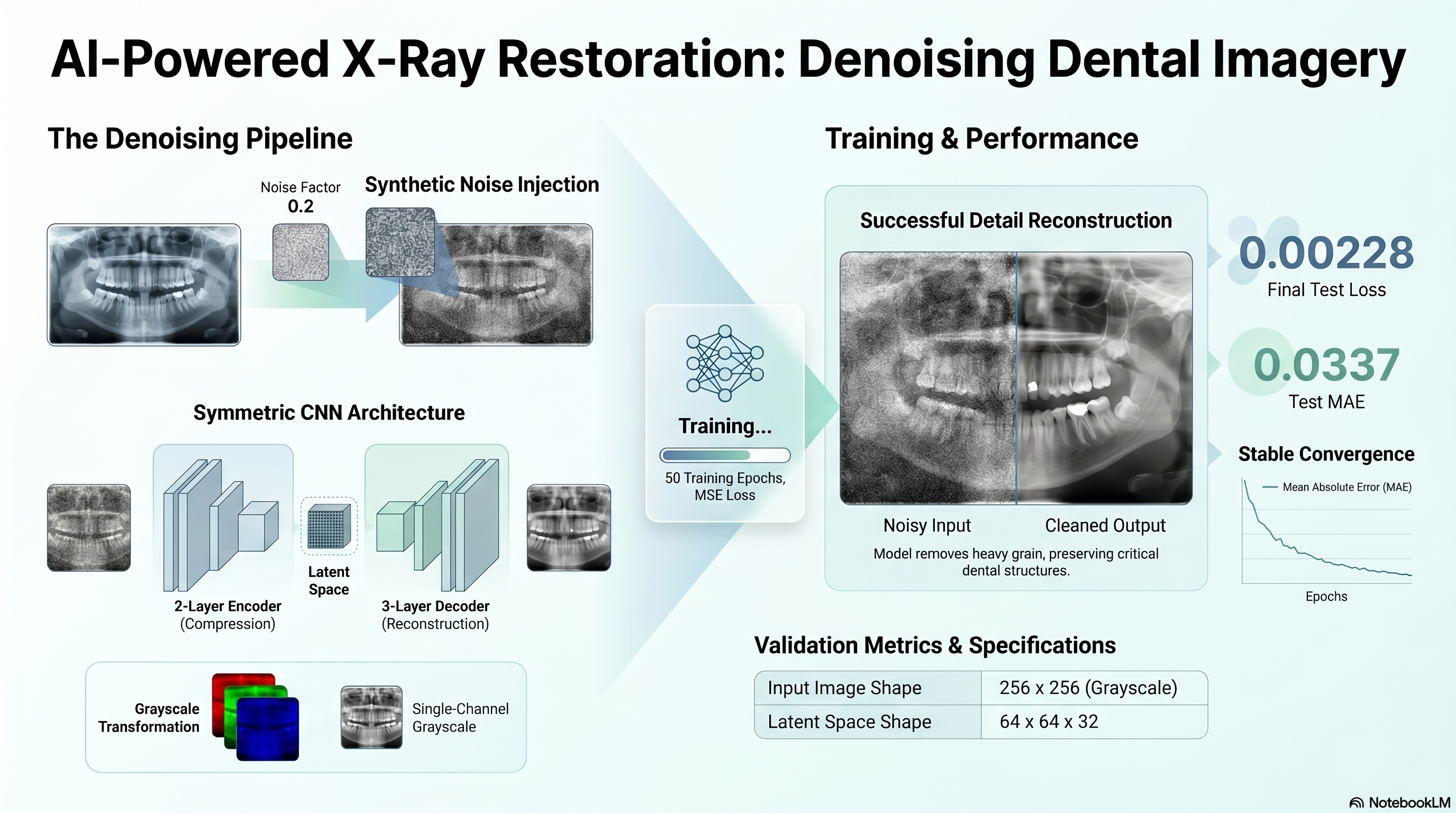
This documentation outlines a capstone project for the Microsoft AI Engineering Program 2026 focused on building a denoising autoencoder for dental X-rays. The technical objective involves processing a panoramic dataset by adding artificial noise and then training a neural network to restore image clarity. To meet specific architectural requirements, the project converts original RGB images into a grayscale format before utilizing convolutional layers for encoding and decoding. The source material includes a detailed requirement checklist, the Python code used for implementation, and various performance metrics such as mean squared error. Final results are demonstrated through visual comparisons and training history logs that verify the model's ability to reconstruct clean images from noisy inputs.

Capstone 12 Scope

Capstone 12 converts the copied dental-autoencoder assignment into an executed denoising notebook with grayscale preparation, training-history outputs, and noisy-versus-denoised evidence panels.

Primary staged dataset: Dental-Panaromic-Autoencoder.npz.

The notebook records the RGB-to-grayscale handling needed to satisfy the copied decoder requirement and stages the comparison visuals under outputs/plots/.

Original Project PDF

The copied project directions are embedded here for direct comparison against the notebook and output artifacts.

Requirement Checklist

1a

Build an autoencoder model to improve the clarity of dental X-rays by denoising the panoramic dental dataset.

Source mapping: Requirements file

1b

Load `Dental-Panaromic-Autoencoder.npz` using `NumPy.load`.

Source mapping: Requirements file

1c

Extract `x_train`, `y_train`, `x_test`, and `y_test` NumPy arrays from the dataset.

Source mapping: Requirements file

1d

Create a noisy version of the dataset by applying random noise to each image.

Source mapping: Requirements file

1e

With a noise factor of `0.2`, add noise to the signal by multiplying the noise factor and random values from a normal distribution.

Source mapping: Requirements file

1f

Clip the signal values between 0 and 1.

Source mapping: Requirements file

1g

Plot the first 5 X-ray images from the original images (`x_train`).

Source mapping: Requirements file

1h

Plot the first 5 X-ray images from the noisy images (`x_train_noisy`).

Source mapping: Requirements file

1i

Train an autoencoder using the noisy image as the input and the original image as the destination, with images shaped `256x256` in RGB scale.

Source mapping: Requirements file

1j

Create a `Denoise` class inherited from `Keras Model`.

Source mapping: Requirements file

1k

Define the encoder with an input layer of shape `256*256*3`.

Source mapping: Requirements file

1l

Add a `Conv2D` layer with 64 filters, kernel size `3,3`, activation `relu`, same padding, and stride 2 to the encoder.

Source mapping: Requirements file

1m

Add a `Conv2D` layer with 32 filters, kernel size `3,3`, activation `relu`, same padding, and stride 2 to the encoder.

Source mapping: Requirements file

1n

Add a `Conv2DTranspose` layer with 32 filters, kernel size `3,3`, activation `relu`, same padding, and stride 2 to the decoder.

Source mapping: Requirements file

1o

Add a `Conv2DTranspose` layer with 64 filters, kernel size `3,3`, activation `relu`, same padding, and stride 2 to the decoder.

Source mapping: Requirements file

1p

Add a `Conv2D` layer with 1 filter, kernel size `3,3`, activation `sigmoid`, and same padding to the decoder.

Source mapping: Requirements file

1q

Create a `call` member function that passes the input to the encoder and the encoder output to the decoder.

Source mapping: Requirements file

1r

Initialize the autoencoder object of class `Denoise`.

Source mapping: Requirements file

1s

Compile the autoencoder with Adam optimizer and `MeanSquaredError` as loss.

Source mapping: Requirements file

1t

Train the autoencoder with `X = x_train_noisy` and `Y = x_train` for 50 epochs using validation data `x_test_noisy` and `x_test`.

Source mapping: Requirements file

1u

Plot training and validation MAE and loss against epochs.

Source mapping: Requirements file

1v

Evaluate the autoencoder model on `x_test`.

Source mapping: Requirements file

1w

Pass `x_test` into the encoder.

Source mapping: Requirements file

1x

Pass the encoded images into the decoder to produce reconstructed images.

Source mapping: Requirements file

1y

Plot the first 10 noisy images (`x_test_noisy`) and the denoised images produced by the autoencoder.

Source mapping: Requirements file

1z

Check how well the autoencoder has performed the denoising task.

Source mapping: Requirements file

Requirement Walkthrough

Each walkthrough block maps the copied PDF requirements to the executed notebook cells, exported outputs, and reviewable evidence staged with this capstone.

12a

Load The NPZ Dataset And Create The Noisy Inputs

Notebook section: NPZ load and noise-generation cells

Requirement: Load the NPZ file, extract the arrays, add noise with factor 0.2, and clip the signals between 0 and 1.

The notebook loads the staged arrays, converts the RGB inputs to grayscale to satisfy the copied single-filter decoder requirement, and generates the noisy train/test inputs.

Results Capture
  • Original shapes: {"x_train":[92,256,256,3],"x_test":[24,256,256,3]}.
  • Noise factor: 0.2.
data = np.load(DATA_PATH)
x_train_gray = x_train.mean(axis=-1, keepdims=True)
x_train_noisy = np.clip(x_train_gray + noise_factor * np.random.normal(...), 0.0, 1.0)
Associated Artifact

Original vs Noisy Train Images

Saved panel comparing original and noisy training images.

Original vs Noisy Train Images
12b

Build And Train The Denoising Autoencoder

Notebook section: Model-class and fit cells

Requirement: Define the Denoise model, compile it with Adam and MeanSquaredError, and train it on noisy versus original images.

The notebook implements the Denoise model class with the copied encoder and decoder structure and exports the loss and MAE history for review.

Results Capture
  • Encoded shape: [24,64,64,32].
  • Decoded shape: [24,256,256,1].
class Denoise(tf.keras.Model):
    def __init__(self):
        ...
autoencoder.compile(optimizer='adam', loss=tf.keras.losses.MeanSquaredError(), metrics=['mae'])
history = autoencoder.fit(...)
Associated Artifact

Training History

Saved loss and MAE curves across training epochs.

Training History
12c

Evaluate The Autoencoder And Show Denoised Outputs

Notebook section: Evaluation and reconstruction cells

Requirement: Evaluate the autoencoder, pass x_test through encoder and decoder, and plot noisy versus denoised outputs.

The notebook evaluates the model on the noisy test set and exports a side-by-side panel of noisy and reconstructed images for the site evidence layer.

Results Capture
  • Test loss is 0.002282.
  • Test MAE is 0.033775.
evaluation = autoencoder.evaluate(x_test_noisy, x_test_gray, verbose=0)
encoded_images = autoencoder.encoder(x_test_noisy).numpy()
decoded_images = autoencoder.decoder(encoded_images).numpy()
Associated Artifact

Noisy vs Denoised Test Images

Saved panel comparing noisy and reconstructed test images.

Noisy vs Denoised Test Images

Interactive Neural Network Lab

This TensorFlow Playground embed is a concept sandbox for the hidden-representation ideas behind the dental autoencoder capstone. It does not run the denoising autoencoder or use the panoramic image data; instead, it uses synthetic problems to make hidden-layer transformation, network depth, and stability under noise easier to inspect before you compare them to the real Session 12 reconstruction outputs.

What This Is
  • The playground is still a classifier demo, so it is not a direct autoencoder replica.
  • Its value on this page is conceptual: it lets you watch how hidden layers reshape inputs into more useful internal structure before the model produces an output.
  • That is closely related to the Session 12 encoder-decoder idea, where the network must learn a stable internal representation before reconstructing the cleaner image.
How To Use It
  1. Pick a preset card above the playground and load it just before the iframe.
  2. Press Play inside the playground to train that scenario and watch how the hidden layers change the learned output surface.
  3. Use the deeper and noisy presets to connect what you see here to the encoder depth and denoising goals in the notebook.
  4. Return to the Session 12 reconstruction plots afterward to connect the concept demo back to the actual autoencoder evidence.
What To Look For
  • Decision Boundary Basics: expect the clearest first look at how hidden layers reshape a simple problem.
  • Hidden Layers On Spiral Data: expect the strongest analogy for deeper latent representations capturing harder structure.
  • ReLU On XOR: expect a compact example of useful nonlinear transformation in hidden space.
  • Regularization Under Noise: expect the closest conceptual match to the denoising goal in the real capstone.
Preset 1

Decision Boundary Basics

Begins with a simple nonlinear classifier so you can see how hidden units reshape the feature space. Session 12 is an autoencoder rather than a classifier, but this still helps explain the core idea that hidden layers learn internal representations instead of preserving the raw input structure unchanged.

Preset 2

Hidden Layers On Spiral Data

Uses a deeper network on the spiral dataset to show how multiple hidden layers can capture more complex structure. That is the closest playground analogy to the encoder-decoder stack in the dental project, where compressed hidden representations are needed before the model can reconstruct cleaner outputs.

Preset 3

ReLU On XOR

Uses ReLU activations on XOR to show how learned nonlinear transformations create a more useful internal feature space. For the denoising autoencoder, this supports the idea that the network must transform the input into a richer hidden representation before it can recover the cleaner signal.

Preset 4

Regularization Under Noise

Adds noise and regularization so you can compare a smoother, less overfit response to messy data. That makes this preset the most directly relevant one for Session 12 because the notebook is also about learning stable structure in the presence of deliberately corrupted inputs.

Loaded preset: Decision Boundary Basics

Use these presets to build intuition for how a model can learn stable internal structure from noisy inputs. They are concept support only; the real Session 12 evidence still comes from the notebook, screenshots, training history, and denoising artifacts saved with the project.

Colab Notebook

This section provides the notebook preview, launch link, and project file links.

The notebook opens in Google Colab when a launch URL is configured, and the project files and outputs remain available here on the site.

Capstone 12 Notebook Workspace
Launch Colab
Embedded Notebook Preview
Cell 1 Markdown

Capstone Session 12

This notebook is generated from the copied Capstone_Session_12.pdf directions and the staged Dental-Panaromic-Autoencoder.npz dataset.

Cell 2 Markdown

Objective

Build the required denoising autoencoder, train it on the staged dental X-ray data, and compare noisy versus reconstructed outputs.

Cell 3 Markdown

Shape Note

The staged arrays are RGB-shaped (256, 256, 3), while the copied PDF also specifies a final decoder layer with 1 filter. This notebook converts the staged RGB arrays to grayscale before training so the model can satisfy the single-channel decoder requirement without inventing a third output convention.

Cell 4 Code · python
from pathlib import Path
import json
import os
import sys
from urllib.parse import quote
from urllib.request import urlretrieve

import matplotlib.pyplot as plt
import numpy as np
import pandas as pd
import tensorflow as tf

os.environ['TF_CPP_MIN_LOG_LEVEL'] = '2'
tf.keras.utils.set_random_seed(42)

IS_COLAB = 'google.colab' in sys.modules
GITHUB_REPO_OWNER = 'FrancisBurnet'
GITHUB_REPO_NAME = 'francisburnet'
GITHUB_REPO_BRANCH = 'main'
CAPSTONE_ROOT = Path('Incremental Capstones/Deep Learning Specialization/Capstone Session 12')
DATA_FILENAME = 'Dental-Panaromic-Autoencoder.npz'


def build_github_url(relative_path: Path, media: bool = False) -> str:
    encoded_path = quote(relative_path.as_posix(), safe='/')
    if media:
        return (
            f"https://media.githubusercontent.com/media/{GITHUB_REPO_OWNER}/{GITHUB_REPO_NAME}/"
            f"{GITHUB_REPO_BRANCH}/{encoded_path}"
        )
    return (
        f"https://raw.githubusercontent.com/{GITHUB_REPO_OWNER}/{GITHUB_REPO_NAME}/"
        f"{GITHUB_REPO_BRANCH}/{encoded_path}"
    )


def resolve_capstone_dir() -> Path | None:
    current = Path.cwd().resolve()
    capstone_parts = CAPSTONE_ROOT.parts
    for candidate in [current, *current.parents]:
        if len(candidate.parts) >= len(capstone_parts) and candidate.parts[-len(capstone_parts):] == capstone_parts:
            return candidate
        nested_candidate = candidate / CAPSTONE_ROOT
        if nested_candidate.exists():
            return nested_candidate
    return None


CAPSTONE_DIR = resolve_capstone_dir()
DATA_URL = build_github_url(CAPSTONE_ROOT / DATA_FILENAME, media=True)

if CAPSTONE_DIR is not None:
    OUTPUT_ROOT = CAPSTONE_DIR
    OUTPUT_MODE = 'permanent capstone outputs'
    OUTPUT_DISPLAY = (CAPSTONE_ROOT / 'outputs').as_posix()
else:
    runtime_root = Path('/content/capstone-session-12-runtime') if IS_COLAB else Path.cwd().resolve() / 'capstone-session-12-runtime'
    OUTPUT_ROOT = runtime_root
    OUTPUT_MODE = 'runtime scratch outputs; export final artifacts back into the capstone outputs folder'
    OUTPUT_DISPLAY = 'capstone-session-12-runtime/outputs'

RUNTIME_DATA_ROOT = Path('/content/capstone-session-12-data') if IS_COLAB else Path.cwd().resolve() / 'capstone-session-12-data'
DATA_CACHE_PATH = RUNTIME_DATA_ROOT / DATA_FILENAME
RUNTIME_DATA_ROOT.mkdir(parents=True, exist_ok=True)
if not DATA_CACHE_PATH.exists():
    urlretrieve(DATA_URL, DATA_CACHE_PATH)

OUTPUTS_DIR = (OUTPUT_ROOT / 'outputs').resolve()
PLOTS_DIR = OUTPUTS_DIR / 'plots'
OUTPUTS_DIR.mkdir(parents=True, exist_ok=True)
PLOTS_DIR.mkdir(parents=True, exist_ok=True)

print('Runtime:', 'Google Colab' if IS_COLAB else 'Notebook runtime')
print('Capstone artifact path:', CAPSTONE_ROOT.as_posix())
print('Data source:', DATA_URL)
print('Data runtime file:', 'capstone-session-12-data/Dental-Panaromic-Autoencoder.npz')
print('Output mode:', OUTPUT_MODE)
print('Output target:', OUTPUT_DISPLAY)
Output
Runtime: Local / notebook runtime
Repository root: X:\SIMPLILEARN\FrancisBurnetCom
Base directory: X:\SIMPLILEARN\FrancisBurnetCom\Incremental Capstones\Deep Learning Specialization\Capstone Session 12
Data path: X:\SIMPLILEARN\FrancisBurnetCom\Incremental Capstones\Deep Learning Specialization\Capstone Session 12\Dental-Panaromic-Autoencoder.npz
Cell 5 Code · python
data = np.load(DATA_CACHE_PATH)
x_train = data['x_train'].astype('float32') / 255.0 if data['x_train'].max() > 1 else data['x_train'].astype('float32')
x_test = data['x_test'].astype('float32') / 255.0 if data['x_test'].max() > 1 else data['x_test'].astype('float32')
x_train_gray = x_train.mean(axis=-1, keepdims=True)
x_test_gray = x_test.mean(axis=-1, keepdims=True)
noise_factor = 0.2
x_train_noisy = np.clip(x_train_gray + noise_factor * np.random.normal(loc=0.0, scale=1.0, size=x_train_gray.shape), 0.0, 1.0)
x_test_noisy = np.clip(x_test_gray + noise_factor * np.random.normal(loc=0.0, scale=1.0, size=x_test_gray.shape), 0.0, 1.0)
print('Data source used:', DATA_URL)
print({'x_train': x_train.shape, 'x_train_gray': x_train_gray.shape, 'x_test': x_test.shape, 'x_test_gray': x_test_gray.shape})
Output
Cell 6 Code · python
fig, axes = plt.subplots(2, 5, figsize=(14, 6))
for index in range(5):
    axes[0, index].imshow(x_train_gray[index].squeeze(), cmap='gray')
    axes[0, index].axis('off')
    axes[0, index].set_title(f'Original {index + 1}')
    axes[1, index].imshow(x_train_noisy[index].squeeze(), cmap='gray')
    axes[1, index].axis('off')
    axes[1, index].set_title(f'Noisy {index + 1}')
fig.tight_layout()
fig.savefig(PLOTS_DIR / 'original_vs_noisy_train.png', dpi=150)
plt.show()
plt.close(fig)
Output
<Figure size 1400x600 with 10 Axes>
Cell 7 Code · python
class Denoise(tf.keras.Model):
    def __init__(self):
        super().__init__()
        self.encoder = tf.keras.Sequential([
            tf.keras.layers.Input(shape=(256, 256, 1)),
            tf.keras.layers.Conv2D(64, (3, 3), activation='relu', padding='same', strides=2),
            tf.keras.layers.Conv2D(32, (3, 3), activation='relu', padding='same', strides=2),
        ])
        self.decoder = tf.keras.Sequential([
            tf.keras.layers.Conv2DTranspose(32, kernel_size=3, strides=2, activation='relu', padding='same'),
            tf.keras.layers.Conv2DTranspose(64, kernel_size=3, strides=2, activation='relu', padding='same'),
            tf.keras.layers.Conv2D(1, kernel_size=(3, 3), activation='sigmoid', padding='same'),
        ])

    def call(self, inputs):
        encoded = self.encoder(inputs)
        decoded = self.decoder(encoded)
        return decoded

autoencoder = Denoise()
autoencoder.compile(optimizer='adam', loss=tf.keras.losses.MeanSquaredError(), metrics=['mae'])
Output
WARNING:tensorflow:TensorFlow GPU support is not available on native Windows for TensorFlow >= 2.11. Even if CUDA/cuDNN are installed, GPU will not be used. Please use WSL2 or the TensorFlow-DirectML plugin.

Cell 8 Code · python
history = autoencoder.fit(
    x_train_noisy,
    x_train_gray,
    epochs=50,
    batch_size=8,
    shuffle=True,
    validation_data=(x_test_noisy, x_test_gray),
    verbose=0,
)
pd.DataFrame(history.history).tail()
Output
        loss       mae  val_loss   val_mae
45  0.002327  0.033945  0.002332  0.034123
46  0.002356  0.034250  0.002390  0.034695
47  0.002378  0.034472  0.002322  0.034076
48  0.002378  0.034481  0.002315  0.034097
49  0.002320  0.033975  0.002282  0.033775
Cell 9 Code · python
evaluation = autoencoder.evaluate(x_test_noisy, x_test_gray, verbose=0)
encoded_images = autoencoder.encoder(x_test_noisy).numpy()
decoded_images = autoencoder.decoder(encoded_images).numpy()
print({'test_loss': float(evaluation[0]), 'test_mae': float(evaluation[1]), 'encoded_shape': encoded_images.shape, 'decoded_shape': decoded_images.shape})
Output
{'test_loss': 0.0022817247081547976, 'test_mae': 0.033774904906749725, 'encoded_shape': (24, 64, 64, 32), 'decoded_shape': (24, 256, 256, 1)}
Cell 10 Code · python
fig, axes = plt.subplots(2, 10, figsize=(18, 5))
for index in range(10):
    axes[0, index].imshow(x_test_noisy[index].squeeze(), cmap='gray')
    axes[0, index].axis('off')
    axes[0, index].set_title(f'Noisy {index + 1}')
    axes[1, index].imshow(decoded_images[index].squeeze(), cmap='gray')
    axes[1, index].axis('off')
    axes[1, index].set_title(f'Denoised {index + 1}')
fig.tight_layout()
fig.savefig(PLOTS_DIR / 'noisy_vs_denoised_test.png', dpi=150)
plt.show()
plt.close(fig)
Output
<Figure size 1800x500 with 20 Axes>
Cell 11 Code · python
fig, axes = plt.subplots(1, 2, figsize=(12, 4))
axes[0].plot(history.history['mae'], label='train')
axes[0].plot(history.history['val_mae'], label='validation')
axes[0].set_title('MAE by Epoch')
axes[0].legend()
axes[1].plot(history.history['loss'], label='train')
axes[1].plot(history.history['val_loss'], label='validation')
axes[1].set_title('Loss by Epoch')
axes[1].legend()
fig.tight_layout()
fig.savefig(PLOTS_DIR / 'training_history.png', dpi=150)
plt.show()
plt.close(fig)
Output
<Figure size 1200x400 with 2 Axes>
Cell 12 Code · python
history_df = pd.DataFrame(history.history)
history_df.to_csv(OUTPUTS_DIR / 'session_12_training_history.csv', index=False)
summary = {
    'original_shapes': {'x_train': list(x_train.shape), 'x_test': list(x_test.shape)},
    'grayscale_shapes': {'x_train_gray': list(x_train_gray.shape), 'x_test_gray': list(x_test_gray.shape)},
    'noise_factor': noise_factor,
    'test_loss': float(evaluation[0]),
    'test_mae': float(evaluation[1]),
    'encoded_shape': list(encoded_images.shape),
    'decoded_shape': list(decoded_images.shape),
}
with open(OUTPUTS_DIR / 'session_12_summary.json', 'w', encoding='utf-8') as handle:
    json.dump(summary, handle, indent=2)
summary
Output
{'original_shapes': {'x_train': [92, 256, 256, 3],
  'x_test': [24, 256, 256, 3]},
 'grayscale_shapes': {'x_train_gray': [92, 256, 256, 1],
  'x_test_gray': [24, 256, 256, 1]},
 'noise_factor': 0.2,
 'test_loss': 0.0022817247081547976,
 'test_mae': 0.033774904906749725,
 'encoded_shape': [24, 64, 64, 32],
 'decoded_shape': [24, 256, 256, 1]}
Project Notes
  • NPZ load, grayscale conversion, and noise generation.
  • Denoise model definition and autoencoder training.
  • Loss/MAE history export.
  • Noisy-versus-denoised image comparison outputs.
Launch Controls

Notebook Launch

Open the matching notebook in Google Colab or review the tracked notebook source in GitHub.

Project File Links

Outputs And Results

Key Outputs
  • Executed notebook artifact saved as capstone_session_12.ipynb.
  • Training-history, original-vs-noisy, and noisy-vs-denoised PNGs are staged for the site workflow.
  • The summary JSON preserves the grayscale conversion and evaluation metrics explicitly.
Key Findings
  • Test loss is 0.002282 and test MAE is 0.033775.
  • The staged RGB dataset is converted to grayscale so the executed model can satisfy the copied single-filter decoder requirement.
  • TensorFlow Playground remains optional concept support while the notebook and reconstruction outputs remain the evidence layer.