Francis Burnet – AI Engineering Portfolio

Capstone portfolio spanning AI engineering, applied data science, machine learning, and deep learning.

Francis Burnet headshot

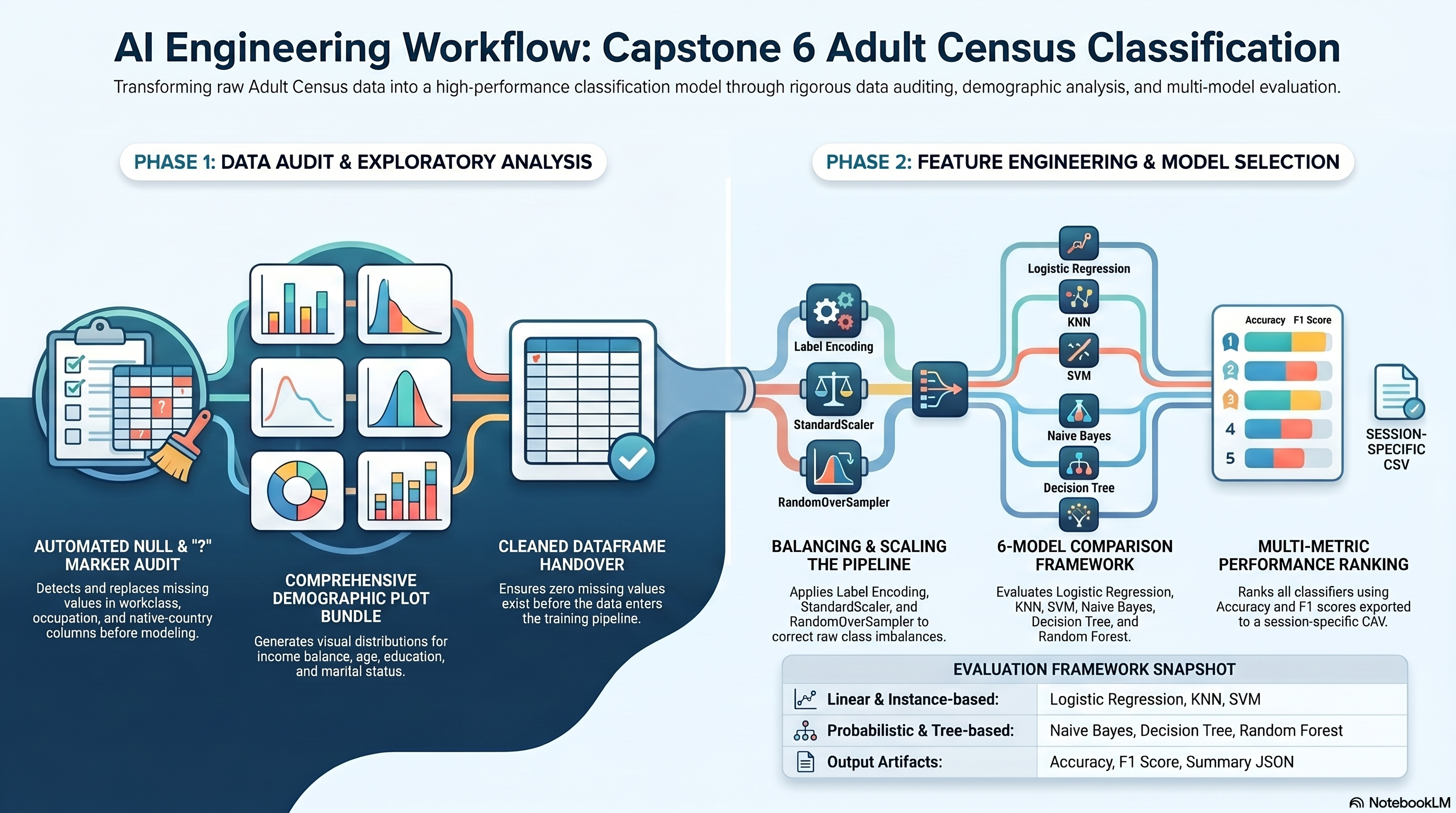
Capstone 6 Evidence Map

Capstone 6 evidence image
Capstone Summary

This documentation details Capstone 6 of the 2026 Microsoft AI Engineering Program, which focuses on a comprehensive Adult Census classification project. The project involves a systematic data science workflow, beginning with the identification and resolution of missing values and the generation of demographic visualizations. To ensure model accuracy, the curriculum requires data encoding, scaling, and oversampling to address inherent class imbalances within the dataset. A significant portion of the work evaluates performance across six different machine learning models, including Random Forest and Logistic Regression. All findings, including performance metrics and data artifacts, are meticulously recorded in structured formats like CSV and JSON for audit purposes. Ultimately, the source serves as a technical portfolio demonstrating applied expertise in deep learning and predictive analytics.

Capstone 6 Scope

Capstone 6 converts the copied Adult Census classification requirements into an executed notebook with cleaning, imbalance repair, exploratory plots, and six-model comparison outputs.

Primary staged dataset: adultcensusincome.csv.

The notebook exports model metrics and a structured summary JSON for the site workflow.

Original Project PDF

The copied project directions are embedded here for direct comparison against the notebook and output artifacts.

Requirement Checklist

1a

Build a classification model for predicting income using the Adult Census Income dataset.

Source mapping: Requirements file

1b

Load the dataset `adultcensusincome.csv`.

Source mapping: Requirements file

1c

Check for null values in any columns.

Source mapping: Requirements file

1d

Check for `?` values in any columns.

Source mapping: Requirements file

1e

Handle the null values and `?` values.

Source mapping: Requirements file

1f

Check the distribution of target variable `income`.

Source mapping: Requirements file

1g

Identify whether the dataset is balanced.

Source mapping: Requirements file

1h

Create a barplot for column `income`.

Source mapping: Requirements file

1i

Create a distribution plot for column `age`.

Source mapping: Requirements file

1j

Create a barplot for column `education`.

Source mapping: Requirements file

1k

Create a barplot for years of education using column `education.num`.

Source mapping: Requirements file

1l

Create a pie chart for marital status using column `marital.status`.

Source mapping: Requirements file

1m

Create a countplot of income across columns age, education, marital status, and sex.

Source mapping: Requirements file

1n

Draw a heatmap of data correlation and identify the columns to which income is highly correlated.

Source mapping: Requirements file

1o

Prepare the dataset for modeling.

Source mapping: Requirements file

1p

Label encode all categorical columns.

Source mapping: Requirements file

1q

Prepare independent variables `X` and dependent variable `Y` (`Income`).

Source mapping: Requirements file

1r

Perform feature scaling using `StandardScaler`.

Source mapping: Requirements file

1s

Fix the imbalance in the dataset using one technique such as `SMOTE` or `RandomOverSampler`.

Source mapping: Requirements file

1t

Perform a train test split in the ratio 80:20 with `random_state 42`.

Source mapping: Requirements file

1u

Train a Logistic Regression model.

Source mapping: Requirements file

1v

Train a KNN Classifier model.

Source mapping: Requirements file

1w

Train an SVM Classifier model.

Source mapping: Requirements file

1x

Train a Naive Bayes Classifier model.

Source mapping: Requirements file

1y

Train a Decision Tree Classifier model.

Source mapping: Requirements file

1z

Train a Random Forest Classifier model.

Source mapping: Requirements file

1aa

Perform model evaluation on Accuracy and F1 score.

Source mapping: Requirements file

1ab

Identify the best model.

Source mapping: Requirements file

Requirement Walkthrough

Each walkthrough block maps the copied PDF requirements to the executed notebook cells, exported outputs, and reviewable evidence staged with this capstone.

6a

Audit Nulls And Question-Mark Values

Notebook section: Load, audit, and cleaning cells

Requirement: Load the dataset, detect nulls and ? markers, and clean the categorical columns before modeling.

The notebook explicitly records the question-mark counts in workclass, occupation, and native.country, then fills the missing values before downstream analysis.

Results Capture
  • Question-mark counts are exported in the summary JSON.
  • The cleaning step leaves zero missing values for the model pipeline.
  • The cleaned dataframe is used for all plots and model training steps.
df = df.replace(' ?', np.nan).replace('?', np.nan)
for column in object_columns:
    if df[column].isna().any():
        df[column] = df[column].fillna(df[column].mode().iloc[0])
Associated Artifact

Correlation Heatmap

Saved encoded-feature correlation heatmap for the income target review.

Correlation Heatmap
6b

Produce The Required Income And Demographic Charts

Notebook section: Distribution and count-plot cells

Requirement: Create the income, age, education, marital-status, and grouped count plots required by the copied PDF.

The notebook exports the full demographic plot bundle so the site can show the income balance view, age distribution, and the grouped categorical comparisons directly.

Results Capture
  • The class balance summary is recorded as {"<=50K":24720,">50K":7841}.
  • The plot bundle includes income, age, education, marital status, and grouped income-by-category visuals.
income_counts = df['income'].value_counts()
sns.barplot(x=income_counts.index, y=income_counts.values)
sns.histplot(df['age'], kde=True)
Associated Artifact

Income Barplot

Saved income class count chart.

Income Barplot
Associated Artifact

Age Distribution

Saved age distribution plot.

Age Distribution
Associated Artifact

Education Barplot

Saved bar chart for education category counts.

Education Barplot
Associated Artifact

Education Level Barplot

Saved bar chart for the numeric education-level distribution.

Education Level Barplot
Associated Artifact

Marital Status Distribution

Saved pie chart for the marital status breakdown.

Marital Status Distribution
Associated Artifact

Income by Education

Saved grouped chart for income distribution by education level.

Income by Education
Associated Artifact

Income by Marital Status

Saved grouped chart for income by marital status.

Income by Marital Status
Associated Artifact

Income by Sex

Saved grouped chart for income by gender.

Income by Sex
Associated Artifact

Income by Age Band

Saved grouped chart for income by age band.

Income by Age Band
Associated Artifact

Model Comparison

Saved comparison chart for model accuracy and F1 score.

Model Comparison
6c

Encode, Balance, Scale, And Compare Classifiers

Notebook section: Encoding, resampling, and model-training cells

Requirement: Label-encode categorical columns, apply StandardScaler, fix class imbalance, and compare Logistic Regression, KNN, SVM, Naive Bayes, Decision Tree, and Random Forest.

The notebook label-encodes the cleaned dataset, uses RandomOverSampler as the explicit imbalance fix, and exports a six-model comparison table scored by accuracy and F1.

Results Capture
  • Balanced training distribution is {"1":19775,"0":19775}.
  • Best model by F1/accuracy ranking: Random Forest Classifier.
  • The comparison table is exported as session_6_model_metrics.csv.
sampler = RandomOverSampler(random_state=42)
X_train_balanced, y_train_balanced = sampler.fit_resample(X_train_scaled, y_train)
model.fit(X_train_balanced, y_train_balanced)

Colab Notebook

This section provides the notebook preview, launch link, and project file links.

The notebook opens in Google Colab when a launch URL is configured, and the project files and outputs remain available here on the site.

Capstone 6 Notebook Workspace
Launch Colab
Embedded Notebook Preview
Cell 1 Markdown

Capstone Session 6

This notebook is generated from the copied Capstone_Session_6.pdf directions and the staged adultcensusincome.csv dataset.

Cell 2 Markdown

Objective

Build and compare classification models for Adult Census income prediction while preserving the PDF-ordered exploratory, preprocessing, imbalance, and evaluation flow.

Cell 3 Code · python
from pathlib import Path
import json
import sys
from urllib.parse import quote

import matplotlib.pyplot as plt
import numpy as np
import pandas as pd
import seaborn as sns
from IPython.display import display
from imblearn.over_sampling import RandomOverSampler
from sklearn.ensemble import RandomForestClassifier
from sklearn.linear_model import LogisticRegression
from sklearn.metrics import accuracy_score, f1_score
from sklearn.model_selection import train_test_split
from sklearn.naive_bayes import GaussianNB
from sklearn.neighbors import KNeighborsClassifier
from sklearn.preprocessing import LabelEncoder, StandardScaler
from sklearn.svm import SVC
from sklearn.tree import DecisionTreeClassifier

IS_COLAB = 'google.colab' in sys.modules
GITHUB_REPO_OWNER = 'FrancisBurnet'
GITHUB_REPO_NAME = 'francisburnet'
GITHUB_REPO_BRANCH = 'main'
CAPSTONE_ROOT = Path('Incremental Capstones/Machine Learning Using Python/Capstone Session 6')
DATASET_FILENAME = 'adultcensusincome.csv'


def build_raw_github_url(relative_path: Path) -> str:
    encoded_path = quote(relative_path.as_posix(), safe='/')
    return (
        f"https://raw.githubusercontent.com/{GITHUB_REPO_OWNER}/{GITHUB_REPO_NAME}/"
        f"{GITHUB_REPO_BRANCH}/{encoded_path}"
    )


def resolve_capstone_dir() -> Path | None:
    current = Path.cwd().resolve()
    capstone_parts = CAPSTONE_ROOT.parts
    for candidate in [current, *current.parents]:
        if len(candidate.parts) >= len(capstone_parts) and candidate.parts[-len(capstone_parts):] == capstone_parts:
            return candidate
        nested_candidate = candidate / CAPSTONE_ROOT
        if nested_candidate.exists():
            return nested_candidate
    return None


CAPSTONE_DIR = resolve_capstone_dir()
DATASET_URL = build_raw_github_url(CAPSTONE_ROOT / DATASET_FILENAME)

if CAPSTONE_DIR is not None:
    OUTPUT_ROOT = CAPSTONE_DIR
    OUTPUT_MODE = 'permanent capstone outputs'
    OUTPUT_DISPLAY = (CAPSTONE_ROOT / 'outputs').as_posix()
else:
    runtime_root = Path('/content/capstone-session-6-runtime') if IS_COLAB else Path.cwd().resolve() / 'capstone-session-6-runtime'
    OUTPUT_ROOT = runtime_root
    OUTPUT_MODE = 'runtime scratch outputs; export final artifacts back into the capstone outputs folder'
    OUTPUT_DISPLAY = 'capstone-session-6-runtime/outputs'

OUTPUTS_DIR = (OUTPUT_ROOT / 'outputs').resolve()
PLOTS_DIR = OUTPUTS_DIR / 'plots'
OUTPUTS_DIR.mkdir(parents=True, exist_ok=True)
PLOTS_DIR.mkdir(parents=True, exist_ok=True)
sns.set_theme(style='whitegrid')
pd.set_option('display.max_columns', 100)

print('Runtime:', 'Google Colab' if IS_COLAB else 'Notebook runtime')
print('Capstone artifact path:', CAPSTONE_ROOT.as_posix())
print('Dataset source:', DATASET_URL)
print('Output mode:', OUTPUT_MODE)
print('Output target:', OUTPUT_DISPLAY)
Cell 4 Code · python
df = pd.read_csv(DATASET_URL)
display(df.head())
print('Dataset source used:', DATASET_URL)
print('Shape:', df.shape)
object_columns = df.select_dtypes(include=['object', 'string']).columns.tolist()
question_mark_counts = {column: int((df[column].astype(str).str.strip() == '?').sum()) for column in object_columns}
print('Question mark counts:', question_mark_counts)
Output
   age workclass  fnlwgt     education  education.num marital.status  \
0   90         ?   77053       HS-grad              9        Widowed   
1   82   Private  132870       HS-grad              9        Widowed   
2   66         ?  186061  Some-college             10        Widowed   
3   54   Private  140359       7th-8th              4       Divorced   
4   41   Private  264663  Some-college             10      Separated   

          occupation   relationship     sex  capital.gain  capital.loss  \
0                  ?  Not-in-family  Female             0          4356   
1    Exec-managerial  Not-in-family  Female             0          4356   
2                  ?      Unmarried  Female             0          4356   
3  Machine-op-inspct      Unmarried  Female             0          3900   
4     Prof-specialty      Own-child  Female             0          3900   

   hours.per.week native.country income  
0              40  United-States  <=50K  
1              18  United-States  <=50K  
2              40  United-States  <=50K  
3              40  United-States  <=50K  
4              40  United-States  <=50K  
Shape: (32561, 14)
Question mark counts: {'workclass': 1836, 'education': 0, 'marital.status': 0, 'occupation': 1843, 'relationship': 0, 'sex': 0, 'native.country': 583, 'income': 0}
Cell 5 Code · python
df = df.replace(' ?', np.nan).replace('?', np.nan)
for column in object_columns:
    if df[column].isna().any():
        df[column] = df[column].fillna(df[column].mode().iloc[0])
for column in df.columns:
    if df[column].isna().any():
        df[column] = df[column].fillna(df[column].median())
print('Remaining null values:', int(df.isna().sum().sum()))
Output
Remaining null values: 0
Cell 6 Code · python
fig, ax = plt.subplots(figsize=(8, 5))
income_counts = df['income'].value_counts()
sns.barplot(x=income_counts.index, y=income_counts.values, ax=ax)
ax.set_title('Income Distribution')
fig.tight_layout()
fig.savefig(PLOTS_DIR / 'income_barplot.png', dpi=150)
plt.show()
plt.close(fig)
balance_summary = {
    'class_counts': income_counts.to_dict(),
    'minority_ratio': round(float(income_counts.min() / income_counts.max()), 4),
}
balance_summary
Output
<Figure size 800x500 with 1 Axes>
{'class_counts': {'<=50K': 24720, '>50K': 7841}, 'minority_ratio': 0.3172}
Cell 7 Code · python
fig, ax = plt.subplots(figsize=(10, 5))
sns.histplot(df['age'], kde=True, ax=ax)
ax.set_title('Age Distribution')
fig.tight_layout()
fig.savefig(PLOTS_DIR / 'age_distribution.png', dpi=150)
plt.show()
plt.close(fig)

for column in ['education', 'education.num']:
    fig, ax = plt.subplots(figsize=(12, 5))
    counts = df[column].value_counts().sort_values(ascending=False).head(15) if column == 'education' else df[column].value_counts().sort_index()
    sns.barplot(x=counts.index.astype(str), y=counts.values, ax=ax)
    ax.set_title(f'{column} Barplot')
    ax.tick_params(axis='x', rotation=35)
    fig.tight_layout()
    fig.savefig(PLOTS_DIR / f'{column.replace('.', '_')}_barplot.png', dpi=150)
    plt.show()
    plt.close(fig)

marital_counts = df['marital.status'].value_counts()
fig, ax = plt.subplots(figsize=(8, 8))
ax.pie(marital_counts.values, labels=marital_counts.index, autopct='%1.1f%%', startangle=90)
ax.set_title('Marital Status Distribution')
fig.tight_layout()
fig.savefig(PLOTS_DIR / 'marital_status_pie.png', dpi=150)
plt.show()
plt.close(fig)
Output
<Figure size 1000x500 with 1 Axes>
<Figure size 1200x500 with 1 Axes>
<Figure size 800x800 with 1 Axes>
Cell 8 Code · python
df['age_band'] = pd.cut(df['age'], bins=[16, 25, 35, 45, 55, 65, 100], include_lowest=True)
for column in ['age_band', 'education', 'marital.status', 'sex']:
    fig, ax = plt.subplots(figsize=(12, 5))
    grouped = pd.crosstab(df[column], df['income'])
    grouped.plot(kind='bar', stacked=False, ax=ax)
    ax.set_title(f'Income Count by {column}')
    ax.tick_params(axis='x', rotation=35)
    fig.tight_layout()
    fig.savefig(PLOTS_DIR / f'income_by_{str(column).replace('.', '_')}.png', dpi=150)
    plt.show()
    plt.close(fig)
Output
<Figure size 1200x500 with 1 Axes>
Cell 9 Code · python
encoded_df = df.copy()
label_encoders = {}
for column in encoded_df.select_dtypes(include=['object', 'string', 'category']).columns:
    encoder = LabelEncoder()
    encoded_df[column] = encoder.fit_transform(encoded_df[column].astype(str))
    label_encoders[column] = encoder

fig, ax = plt.subplots(figsize=(12, 8))
sns.heatmap(encoded_df.corr(numeric_only=True), cmap='viridis', ax=ax)
ax.set_title('Encoded Feature Correlation Heatmap')
fig.tight_layout()
fig.savefig(PLOTS_DIR / 'correlation_heatmap.png', dpi=150)
plt.show()
plt.close(fig)
correlation_to_income = encoded_df.corr(numeric_only=True)['income'].sort_values(ascending=False).to_dict()
correlation_to_income
Output
<Figure size 1200x800 with 2 Axes>
{'income': 1.0,
 'education.num': 0.335153952690943,
 'age_band': 0.23638023840533365,
 'age': 0.234037102648859,
 'hours.per.week': 0.22968906567080932,
 'capital.gain': 0.22332881819538292,
 'sex': 0.21598015058403752,
 'capital.loss': 0.15052631177035683,
 'education': 0.07931660927729825,
 'occupation': 0.03462453745149705,
 'native.country': 0.02305804502812131,
 'workclass': 0.0026929737847155824,
 'fnlwgt': -0.009462557247529214,
 'marital.status': -0.19930700917197833,
 'relationship': -0.25091814171775123}
Cell 10 Code · python
X = encoded_df.drop(columns=['income'])
y = encoded_df['income']
X_train, X_test, y_train, y_test = train_test_split(X, y, test_size=0.2, random_state=42, stratify=y)
scaler = StandardScaler()
X_train_scaled = scaler.fit_transform(X_train)
X_test_scaled = scaler.transform(X_test)
sampler = RandomOverSampler(random_state=42)
X_train_balanced, y_train_balanced = sampler.fit_resample(X_train_scaled, y_train)
print('Balanced train distribution:', pd.Series(y_train_balanced).value_counts().to_dict())
Output
Balanced train distribution: {1: 19775, 0: 19775}
Cell 11 Code · python
models = {
    'Logistic Regression': LogisticRegression(max_iter=1000),
    'KNN Classifier': KNeighborsClassifier(),
    'SVM Classifier': SVC(),
    'Naive Bayes Classifier': GaussianNB(),
    'Decision Tree Classifier': DecisionTreeClassifier(random_state=42),
    'Random Forest Classifier': RandomForestClassifier(random_state=42, n_estimators=200),
}
results = []
for name, model in models.items():
    model.fit(X_train_balanced, y_train_balanced)
    predictions = model.predict(X_test_scaled)
    results.append({
        'model': name,
        'accuracy': float(accuracy_score(y_test, predictions)),
        'f1_score': float(f1_score(y_test, predictions)),
    })
results_df = pd.DataFrame(results).sort_values(['f1_score', 'accuracy'], ascending=False).reset_index(drop=True)
display(results_df)
best_model = results_df.iloc[0].to_dict()
best_model
Output
                      model  accuracy  f1_score
0  Random Forest Classifier  0.849532  0.688889
1            SVM Classifier  0.793951  0.665002
2            KNN Classifier  0.777675  0.627955
3       Logistic Regression  0.775986  0.621334
4  Decision Tree Classifier  0.809458  0.600064
5    Naive Bayes Classifier  0.817442  0.567794
{'model': 'Random Forest Classifier',
 'accuracy': 0.849531705819131,
 'f1_score': 0.6888888888888889}
Cell 12 Code · python
fig, ax = plt.subplots(figsize=(10, 5))
results_df.plot(x='model', y=['accuracy', 'f1_score'], kind='bar', ax=ax)
ax.set_title('Session 6 Model Comparison')
ax.set_ylim(0, 1.05)
fig.tight_layout()
fig.savefig(PLOTS_DIR / 'model_comparison.png', dpi=150)
plt.show()
plt.close(fig)
results_df.to_csv(OUTPUTS_DIR / 'session_6_model_metrics.csv', index=False)
summary = {
    'dataset_shape': list(df.shape),
    'question_mark_counts_before_cleaning': question_mark_counts,
    'balance_summary': balance_summary,
    'balanced_train_distribution': pd.Series(y_train_balanced).value_counts().to_dict(),
    'correlation_to_income': correlation_to_income,
    'model_results': results,
    'best_model': best_model,
    'notes': [
        'RandomOverSampler is used as the explicit imbalance-fix technique from the PDF options.',
        'The split is stratified to preserve the original class ratio before balancing the training data.',
    ],
}
with open(OUTPUTS_DIR / 'session_6_summary.json', 'w', encoding='utf-8') as handle:
    json.dump(summary, handle, indent=2)
summary
Output
<Figure size 1000x500 with 1 Axes>
{'dataset_shape': [32561, 15],
 'question_mark_counts_before_cleaning': {'workclass': 1836,
  'education': 0,
  'marital.status': 0,
  'occupation': 1843,
  'relationship': 0,
  'sex': 0,
  'native.country': 583,
  'income': 0},
 'balance_summary': {'class_counts': {'<=50K': 24720, '>50K': 7841},
  'minority_ratio': 0.3172},
 'balanced_train_distribution': {1: 19775, 0: 19775},
 'correlation_to_income': {'income': 1.0,
  'education.num': 0.335153952690943,
  'age_band': 0.23638023840533365,
  'age': 0.234037102648859,
  'hours.per.week': 0.22968906567080932,
  'capital.gain': 0.22332881819538292,
  'sex': 0.21598015058403752,
  'capital.loss': 0.15052631177035683,
  'education': 0.07931660927729825,
  'occupation': 0.03462453745149705,
  'native.country': 0.02305804502812131,
  'workclass': 0.0026929737847155824,
  'fnlwgt': -0.009462557247529214,
  'marital.status': -0.19930700917197833,
  'relationship': -0.25091814171775123},
 'model_results': [{'model': 'Logistic Regression',
   'accuracy': 0.7759864885613389,
   'f1_score': 0.6213340254347262},
  {'model': 'KNN Classifier',
   'accuracy': 0.7776754183939812,
   'f1_score': 0.6279547790339157},
  {'model': 'SVM Classifier',
   'accuracy': 0.7939505604176262,
   'f1_score': 0.6650024962556166},
  {'model': 'Naive Bayes Classifier',
   'accuracy': 0.8174420389989252,
   'f1_score': 0.5677935296255907},
  {'model': 'Decision Tree Classifier',
   'accuracy': 0.8094580070627975,
   'f1_score': 0.6000644537544312},
  {'model': 'Random Forest Classifier',
   'accuracy': 0.849531705819131,
   'f1_score': 0.6888888888888889}],
 'best_model': {'model': 'Random Forest Classifier',
  'accuracy': 0.849531705819131,
  'f1_score': 0.6888888888888889},
 'notes': ['RandomOverSampler is used as the explicit imbalance-fix technique from the PDF options.',
  'The split is stratified to preserve the original class ratio before balancing the training data.']}

Project Notes
  • Question-mark and null-value audit.
  • Demographic and target-distribution plot bundle.
  • Encoded feature correlation review.
  • Imbalance repair and six-model comparison outputs.
Launch Controls

Notebook Launch

Open the matching notebook in Google Colab or review the tracked notebook source in GitHub.

Project File Links
  • Notebook File: Open Notebook File
    Executed Session 6 notebook for the copied Adult Census workflow.
  • Source Dataset: Open Source Dataset
    Original Adult Census dataset staged with the copied capstone files.
  • Model Metrics CSV: Open Model Metrics CSV
    Accuracy and F1 export for the six evaluated classifiers.
  • Summary JSON: Open Summary JSON
    Structured summary of cleaning counts, class balance, and best model.

Outputs And Results

Key Outputs
  • Executed notebook artifact saved as capstone_session_6.ipynb.
  • The model comparison export ranks six classifiers by accuracy and F1 score.
  • The plot bundle covers target distribution, age, education, marital status, grouped income counts, and encoded correlation.
Key Findings
  • The class imbalance remains visible in the raw data with counts {"<=50K":24720,">50K":7841}.
  • The current best model is Random Forest Classifier.
  • The page now exposes both the preprocessing evidence and the final classification comparison artifacts.