Applied Data Science
Capstone 4
Visualization, correlation review, and healthcare trend reporting using the updated NSMES analysis dataset.
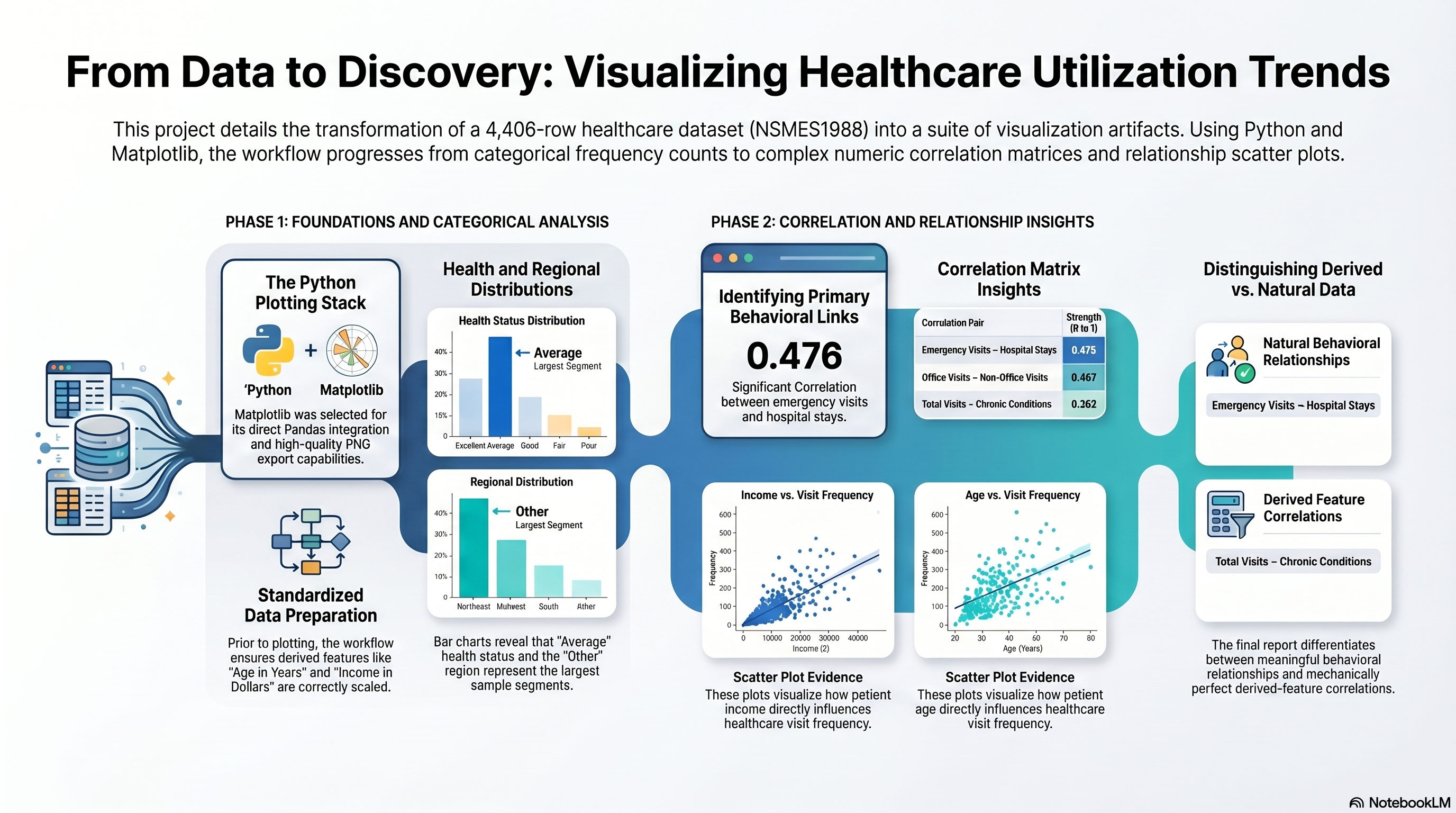
Capstone 4 Infographic
This infographic provides the quick visual version of the plotting and reporting workflow before the page moves into the saved charts, observations, and notebook evidence.
Capstone 4 Scope
Capstone 4 turns the prior analysis work into required saved visuals, making the notebook, chart exports, and written observations reviewable together in one PHP page.
Primary notebook input: Capstone 2/outputs/NSMES1988updated.csv.
Notebook evidence, plot artifacts, and code screenshots.
Original Project PDF
The original Capstone 4 directions are embedded here.
Requirement Checklist
4a
Import relevant Python libraries necessary for Python and Pandas analysis, as well as visualization.
Source mapping: Notebook setup and imports
Evidence note: The notebook imports `pandas` for grouped summaries and `matplotlib.pyplot` for plot generation and PNG export.
4b
Import the CSV file `NSMES1988updated.csv` and create a new dataframe for working with Pandas.
Source mapping: Notebook load step
Evidence note: The notebook loads the Capstone 2 updated handoff dataset and ensures the derived year and dollar columns are available.
4c
Indicate the plotting library choice and reasons for the choice.
Source mapping: Notebook C4-T3
Evidence note: The notebook explicitly records Matplotlib as the plotting library and explains its export and customization benefits.
4d
Plot the Week 3 categorical data for Health and Region.
Source mapping: Notebook C4-T4
Evidence note: The notebook saves `region_counts.png`, `health_counts.png`, and `mean_visits_region_health.png` under `outputs/plots/`.
4e
Plot the Week 4 analyses and correlation.
Source mapping: Notebook C4-T5
Evidence note: The notebook exports the correlation matrix plus three scatter plots for the required relationship analysis.
4f
Prepare a detailed report and record your observations.
Source mapping: Notebook markdown and conclusions
Evidence note: The notebook markdown summarizes plot observations and records the final conclusion with saved-artifact notes.
Requirement Walkthrough
Each walkthrough block maps one required visualization step to the notebook section, the saved artifacts, and the interpretation notes recorded in the notebook.
4a
Set Up The Visualization Notebook And Load The Updated Dataset
Notebook section: Setup, imports, and load cells
Requirement: Import the required analysis and visualization libraries and load `NSMES1988updated.csv`.
Capstone 4 starts from the Capstone 2 updated dataset and brings in the minimum library set needed to build, show, and save the required charts.
Results Capture
- Libraries used: `pandas` and `matplotlib.pyplot`.
- Main input: `Capstone 2/outputs/NSMES1988updated.csv`.
- The notebook ensures `age_years` and `income_dollars` exist before generating chart inputs.
import pandas as pd
import matplotlib.pyplot as plt

DEFAULT_DATASET = "NSMES1988updated.csv"
dataset_path = resolve_dataset_path(DEFAULT_DATASET)
df = pd.read_csv(dataset_path)

if "age_years" not in df.columns and "age" in df.columns:
    df["age_years"] = (df["age"] * 10).round(0)
if "income_dollars" not in df.columns and "income" in df.columns:
    df["income_dollars"] = (df["income"] * 10000).round(0)
4b
State The Plotting Library Choice
Notebook section: C4-T3
Requirement: Indicate the plotting library choice and reasons for the choice.
The notebook records the plotting stack before any charts are produced so the page can map the tool choice directly to the PDF instruction.
Results Capture
- Library choice: Matplotlib.
- Reasons recorded in the notebook: direct pandas compatibility, flexible formatting, and reliable PNG export for grading artifacts.
- This requirement records the plotting-library choice and justification.
print("Plotting library: matplotlib")
print("Reason: direct pandas compatibility, flexible formatting, and reliable PNG export for grading artifacts.")
4c
Plot Health And Region Analysis
Notebook section: C4-T4
Requirement: Plot the Week 3 categorical analysis for Health and Region.
Capstone 4 converts the Week 3 categorical findings into saved bar charts and a grouped region-health utilization chart.
Results Capture
- Saved categorical plot artifacts: `region_counts.png`, `health_counts.png`, and `mean_visits_region_health.png`.
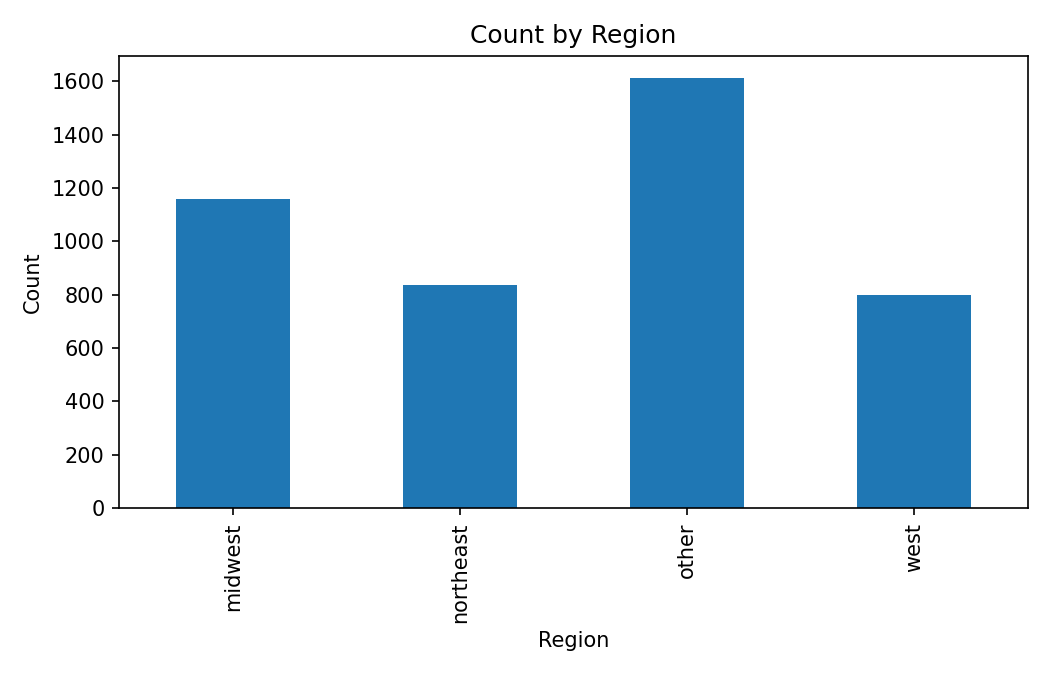
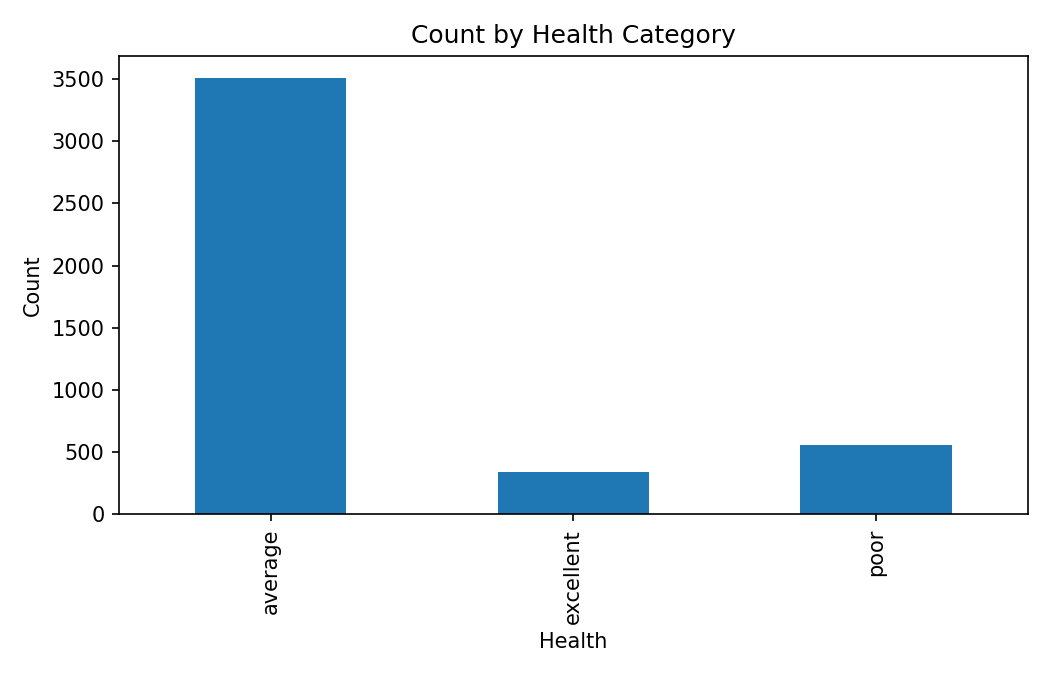
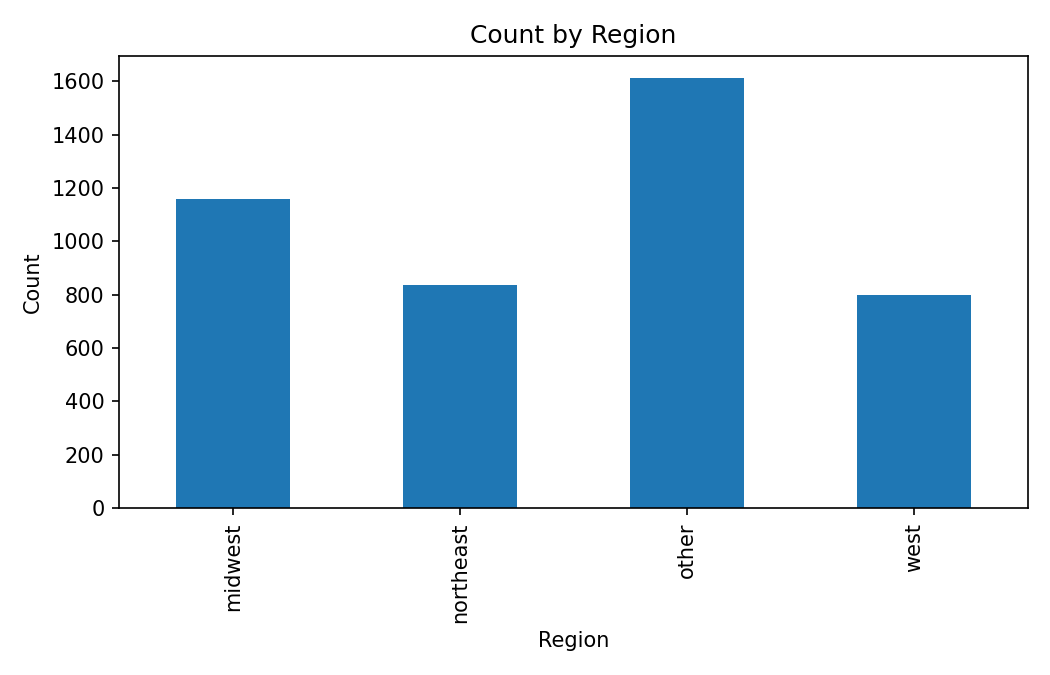
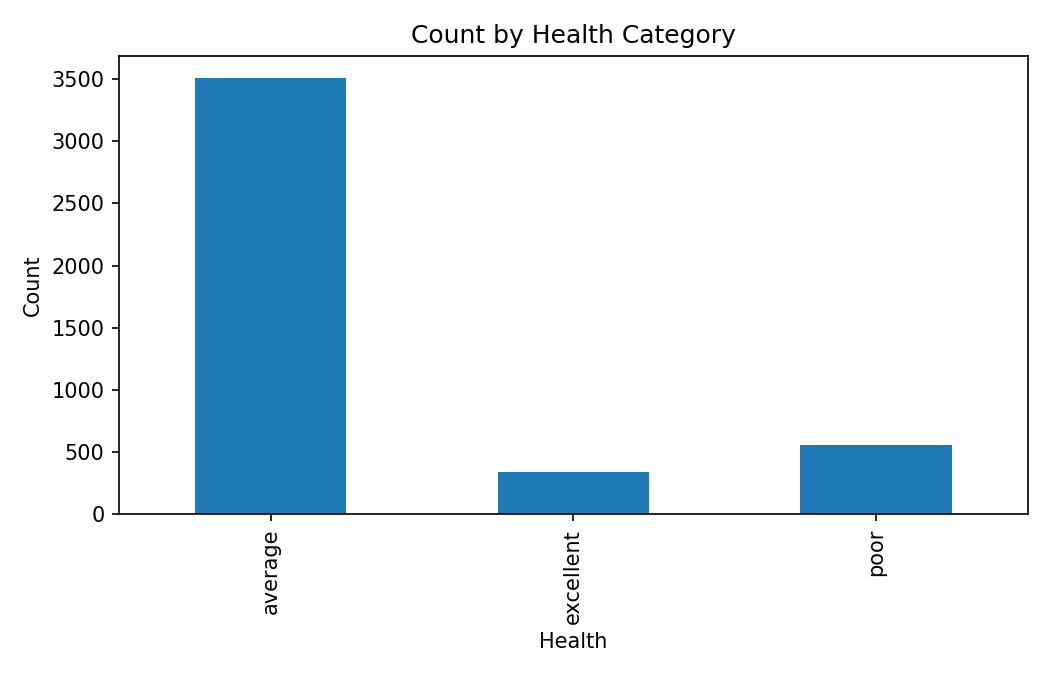
- The notebook notes that the `other` region has the largest count and `average` health dominates the sample.
- The grouped region-health chart preserves the segmented visits story from the Capstone 3 pivot work.
region_counts = df["region"].value_counts()
fig, ax = plt.subplots(figsize=(7, 4.5))
region_counts.sort_index().plot(kind="bar", title="Count by Region", ax=ax)
fig.savefig(PLOTS_DIR / "region_counts.png", dpi=150)

fig, ax = plt.subplots(figsize=(7, 4.5))
df["health"].value_counts().sort_index().plot(kind="bar", title="Count by Health Category", ax=ax)
fig.savefig(PLOTS_DIR / "health_counts.png", dpi=150)

pivot_visits = pd.pivot_table(df, index="region", columns="health", values="visits", aggfunc="mean")
fig, ax = plt.subplots(figsize=(8, 5))
pivot_visits.plot(kind="bar", ax=ax)
fig.savefig(PLOTS_DIR / "mean_visits_region_health.png", dpi=150)
Associated Chart
Count by Region
Saved bar chart for the region frequency breakdown.
Associated Chart
Count by Health Category
Saved bar chart for the health category distribution.
Associated Chart
Mean Visits by Region and Health
Grouped chart tying the Week 3 categorical analysis to average visit levels.

4d
Plot Correlation And Relationship Analysis
Notebook section: C4-T5
Requirement: Plot the Week 4 analysis and correlation.
The notebook then moves from grouped categorical views into numeric correlation structure and scatter-relationship plots for the requested analysis layer.
Results Capture
- Saved correlation and scatter artifacts: `correlation_matrix.png`, `scatter_income_vs_visits.png`, `scatter_age_vs_visits.png`, `scatter_income_vs_emergency.png`.
- Notebook correlation highlights include `emergency~hospital=0.476`, `ovisits~novisits=0.467`, and `visits~chronic=0.262`.
- The notebook also records the expected `1.0` correlation for the derived pairs `age~age_years` and `income~income_dollars`.
num_df = df.select_dtypes(include=["number"])
corr = num_df.corr(numeric_only=True)

fig, ax = plt.subplots(figsize=(10, 8))
cax = ax.imshow(corr, cmap="coolwarm", vmin=-1, vmax=1)
fig.colorbar(cax, ax=ax)
fig.savefig(PLOTS_DIR / "correlation_matrix.png", dpi=150)

for x, y, fname, title in [
    ("income_dollars", "visits", "scatter_income_vs_visits.png", "Income vs Visits"),
    ("age_years", "visits", "scatter_age_vs_visits.png", "Age vs Visits"),
    ("income_dollars", "emergency", "scatter_income_vs_emergency.png", "Income vs Emergency Visits"),
]:
    fig, ax = plt.subplots(figsize=(6.5, 4.5))
    ax.scatter(df[x], df[y], alpha=0.3, s=12)
    fig.savefig(PLOTS_DIR / fname, dpi=150)
Associated Chart
Correlation Matrix
Heatmap used to scan the full numeric correlation structure.

Associated Chart
Income vs Visits
Scatter plot for the income and total visits relationship.

Associated Chart
Age vs Visits
Scatter plot for the age and total visits relationship.

Associated Chart
Income vs Emergency Visits
Scatter plot for the income and emergency visits relationship.

4e
Record The Final Report And Observations
Notebook section: Final conclusions
Requirement: Prepare a detailed report and record your observations.
The notebook finishes by converting the saved chart outputs into an explicit observation set so the page can present both the figures and the interpretation layer.
Results Capture
- The notebook confirms all required visualization artifacts are saved under `outputs/plots/`.
- The final notes distinguish true relationships from derived-feature correlations that are mechanically perfect.
- The page can therefore surface both the plots and the notebook’s written caveats without inventing new claims.
print("Capstone 4 completed: C4-T3 to C4-T5")
print("Artifacts saved under outputs/plots")
Data And Artifact Links
The links below open the Capstone 4 project files.
Artifact
Original Project PDF
View the copied Capstone 4 directions PDF used as the source requirement document.
Artifact
Notebook Evidence
Open the Capstone 4 notebook in the browser-friendly artifact viewer.
Artifact
Requirements Checklist
Open the Capstone 4 requirements file created from the copied PDF task list.
Artifact
Reference Source CSV
Open the original `NSMES1988.csv` source copy kept with Capstone 4.
Artifact
Capstone 2 Updated Input CSV
Open the `NSMES1988updated.csv` handoff dataset used to generate the Capstone 4 charts.
Artifact
Project Infographic
Open the user-supplied Capstone 4 infographic asset.
Artifact
Count by region chart
Open the staged plot artifact generated by the Capstone 4 notebook.
Artifact
Count by health category chart
Open the staged plot artifact generated by the Capstone 4 notebook.
Artifact
Mean visits by region and health chart
Open the staged plot artifact generated by the Capstone 4 notebook.
Artifact
Correlation matrix heatmap
Open the staged plot artifact generated by the Capstone 4 notebook.
Artifact
Income versus visits scatter plot
Open the staged plot artifact generated by the Capstone 4 notebook.
Artifact
Age versus visits scatter plot
Open the staged plot artifact generated by the Capstone 4 notebook.
Artifact
Income versus emergency visits scatter plot
Open the staged plot artifact generated by the Capstone 4 notebook.
Colab Notebook
This section provides the notebook preview, launch link, and project file links.
Saved plot files and notebook output provide the execution record for this capstone.
Embedded Notebook Preview
Cell 1 Markdown
Capstone 4 — Session 4: Data Visualization Techniques
Run timestamp: 2026-02-19 01:49:22
Goal
- I converted Week 3 and Week 4 analysis into required visual outputs and documented interpretation-ready findings.
- I generated and saved all required plots for categorical comparisons and correlation/relationship analysis.
Inputs
NSMES1988updated.csv from Capstone 2/outputs/
Outputs
- All exports go to
./outputs/ (and plots to ./outputs/plots/ when applicable)
Libraries (documented)
pandas: I used it to prepare grouped summaries and correlation inputs for plotting.matplotlib: I used it to build and save all required charts to outputs/plots/.
Key dataset note
age is encoded as Age in years (divided by 10) (e.g., 6.9 = 69 years).
Cell 2 Markdown
C?-T0 — Runtime setup (paths + output folders)
I used this setup cell first to initialize reproducible paths and plotting output folders.
Cell 3 Code · python
from pathlib import Path
from datetime import datetime
from urllib.parse import quote
from urllib.request import urlretrieve
import os
import sys

try:
    from IPython.display import display as _ipy_display
except Exception:
    _ipy_display = None

def show(value):
    if _ipy_display is not None:
        _ipy_display(value)
    else:
        print(value)

# --- Project metadata ---
CAPSTONE = 4
SESSION_TITLE = 'Session 4: Data Visualization Techniques'
IS_COLAB = 'google.colab' in sys.modules
RAW_BASE = os.environ.get('FRANCISBURNET_RAW_BASE', 'https://raw.githubusercontent.com/FrancisBurnet/francisburnet/main')

print(f"Capstone: {CAPSTONE} | Session: {SESSION_TITLE}")
print("Run timestamp:", datetime.now().strftime("%Y-%m-%d %H:%M:%S"))
print("Runtime:", "Google Colab" if IS_COLAB else "Local / notebook runtime")

CWD = Path.cwd()
if IS_COLAB:
    BASE_DIR = Path('/content/francisburnet_capstone_4')
elif (CWD / f"Capstone {CAPSTONE}").exists():
    BASE_DIR = CWD / f"Capstone {CAPSTONE}"
elif CWD.name == f"Capstone {CAPSTONE}":
    BASE_DIR = CWD
elif (CWD / "Incremental_Capstone" / f"Capstone {CAPSTONE}").exists():
    BASE_DIR = CWD / "Incremental_Capstone" / f"Capstone {CAPSTONE}"
else:
    BASE_DIR = CWD

INPUT_DIR = BASE_DIR / "inputs"
OUTPUT_DIR = BASE_DIR / "outputs"
PLOTS_DIR = OUTPUT_DIR / "plots"
INPUT_DIR.mkdir(parents=True, exist_ok=True)
OUTPUT_DIR.mkdir(parents=True, exist_ok=True)
PLOTS_DIR.mkdir(parents=True, exist_ok=True)

# --- Helpers ---
def first_existing_path(candidates):
    for candidate in candidates:
        candidate = Path(candidate).expanduser()
        if candidate.exists():
            return candidate
    return None

def github_raw_url(relative_path: str) -> str:
    normalized = relative_path.replace('\\', '/')
    return RAW_BASE.rstrip('/') + '/' + quote(normalized, safe='/')

def stage_colab_asset(relative_path: str, destination_name=None) -> Path:
    destination = INPUT_DIR / (destination_name or Path(relative_path).name)
    if not destination.exists():
        asset_url = github_raw_url(relative_path)
        urlretrieve(asset_url, destination)
        print('Downloaded:', destination.name, 'from', asset_url)
    return destination

def resolve_dataset_path(default_filename: str) -> Path:
    """Resolve dataset path from local folders or the Colab staging folder."""
    path = first_existing_path([
        INPUT_DIR / default_filename,
        BASE_DIR / default_filename,
        CWD / default_filename,
        CWD / "Incremental_Capstone" / f"Capstone {CAPSTONE}" / default_filename,
    ])
    if path is None:
        raise FileNotFoundError(f"Dataset not found: {default_filename}")
    return path

print("Base directory:", BASE_DIR)
print("Output directory:", OUTPUT_DIR)
print("Plots directory:", PLOTS_DIR)
Output
Capstone: 4 | Session: Session 4: Data Visualization Techniques
Run timestamp: 2026-02-19 00:32:05
Output directory: c:\DEV_Projects\SIMPLILEARN\CAPSTONE_Applied_Data_Science_with _Python\Incremental_Capstone\Capstone 4\outputs
Plots directory: c:\DEV_Projects\SIMPLILEARN\CAPSTONE_Applied_Data_Science_with _Python\Incremental_Capstone\Capstone 4\outputs\plots
Cell 4 Markdown
C?-T1 — Imports (ONLY what you use)
I documented each import with why I used it and what it enabled in this capstone.
Cell 5 Code · python
import pandas as pd  # DataFrames + aggregation/pivot/correlation preparation
import matplotlib.pyplot as plt  # Plot creation and export to outputs/plots
Cell 6 Markdown
C?-T2 — Load dataset
I loaded the instructed handoff dataset from Capstone 2 using default + fallback paths.
Cell 7 Code · python
DEFAULT_DATASET = "NSMES1988updated.csv"

try:
    dataset_path = resolve_dataset_path(DEFAULT_DATASET)
except FileNotFoundError:
    fallback = first_existing_path([
        BASE_DIR.parent / "Capstone 2" / "outputs" / "NSMES1988updated.csv",
        CWD / "Capstone 2" / "outputs" / "NSMES1988updated.csv",
        CWD / "Incremental_Capstone" / "Capstone 2" / "outputs" / "NSMES1988updated.csv",
    ])
    if fallback is None and IS_COLAB:
        fallback = stage_colab_asset(
            'Incremental Capstones/Applied Data Science with Python/Capstone 2/outputs/NSMES1988updated.csv'
        )
    if fallback is None:
        raise
    dataset_path = fallback
    print("Local default not found; using fallback:", dataset_path)

df = pd.read_csv(dataset_path)
if "age_years" not in df.columns and "age" in df.columns:
    df["age_years"] = (df["age"] * 10).round(0)
if "income_dollars" not in df.columns and "income" in df.columns:
    df["income_dollars"] = (df["income"] * 10000).round(0)

print("Loaded:", dataset_path)
print("Shape:", df.shape)
show(df.head())
Output
Local default not found; using fallback: c:\DEV_Projects\SIMPLILEARN\CAPSTONE_Applied_Data_Science_with _Python\Incremental_Capstone\Capstone 2\outputs\NSMES1988updated.csv
Loaded: c:\DEV_Projects\SIMPLILEARN\CAPSTONE_Applied_Data_Science_with _Python\Incremental_Capstone\Capstone 2\outputs\NSMES1988updated.csv
Shape: (4406, 20)
   visits  nvisits  ovisits  novisits  emergency  hospital   health  chronic  \
0       5        0        0         0          0         1  average        2
1       1        0        2         0          2         0  average        2
2      13        0        0         0          3         3     poor        4
3      16        0        5         0          1         1     poor        2
4       3        0        0         0          0         0  average        2

       adl region  age  gender married  school  income employed insurance  \
0   normal  other  6.9    male     yes       6  2.8810      yes       yes
1   normal  other  7.4  female     yes      10  2.7478       no       yes
2  limited  other  6.6  female      no      10  0.6532       no        no
3  limited  other  7.6    male     yes       3  0.6588       no       yes
4  limited  other  7.9  female     yes       6  0.6588       no       yes

  medicaid  age_years  income_dollars
0       no         69           28810
1       no         74           27478
2      yes         66            6532
3       no         76            6588
4       no         79            6588
Cell 8 Markdown
C?-T3 — Validation checks
- Confirm expected columns exist
- Confirm key dtypes
- Check missing values
Results Capture:
- What I did: I validated expected schema/dtypes and checked missing values prior to plotting.
- What I found: shape=
(4406, 20) and no missing values; plotting fields required for tasks are available.
- Caveats: derived pairs (
age vs age_years, income vs income_dollars) naturally dominate top correlation rankings.
Cell 9 Code · python
expected_cols = [
    "visits", "nvisits", "ovisits", "novisits", "emergency", "hospital",
    "health", "chronic", "adl", "region", "age", "gender",
    "married", "school", "income", "employed", "insurance", "medicaid",
    "age_years", "income_dollars"
]

missing_cols = [c for c in expected_cols if c not in df.columns]
print("Missing expected columns:", missing_cols)

print("\nDtypes:")
show(df.dtypes)

print("\nMissing values (count):")
na_counts = df.isna().sum().sort_values(ascending=False)
show(na_counts[na_counts > 0] if (na_counts > 0).any() else na_counts.head())
Output
Missing expected columns: []

Dtypes:
visits              int64
nvisits             int64
ovisits             int64
novisits            int64
emergency           int64
hospital            int64
health                str
chronic             int64
adl                   str
region                str
age               float64
gender                str
married               str
school              int64
income            float64
employed              str
insurance             str
medicaid              str
age_years           int64
income_dollars      int64
dtype: object
Missing values (count):
visits       0
nvisits      0
ovisits      0
novisits     0
emergency    0
dtype: int64
Cell 10 Markdown
C4-T3 — State plotting library choice + reasons
PDF requirement: State which library you used for plotting and why.
What I completed
- I used Matplotlib for all required visualizations and file exports.
Results Capture
- Library choice: Matplotlib.
- Reasons: strong pandas compatibility, clear customization, and straightforward PNG export to
outputs/plots/.
Code evidence
- The next cell prints the plotting-library choice summary used in this submission.
Cell 11 Code · python
print("Plotting library: matplotlib")
print("Reason: direct pandas compatibility, flexible formatting, and reliable PNG export for grading artifacts.")
Output
Plotting library: matplotlib
Reason: direct pandas compatibility, flexible formatting, and reliable PNG export for grading artifacts.
Cell 12 Markdown
C4-T4 — Plot Week 3 categorical analysis for Health and Region
PDF requirement: Plot the Week 3 categorical analysis for Health and Region.
What I completed
- I transformed Week 3 category analysis into saved bar-chart visualizations for region and health, plus a grouped region-health visits chart.
Results Capture
- Saved plot artifacts:
outputs/plots/region_counts.pngoutputs/plots/health_counts.pngoutputs/plots/mean_visits_region_health.png- Interpretation highlights:
other region has the largest count, while west has the smallest.average health status dominates the sample compared with excellent and poor.- Mean visits vary across region-health segments.
Artifacts
outputs/plots/region_counts.png (example)outputs/plots/health_*.png
Code evidence
- The next cell contains all categorical plotting commands I ran and saved.
Cell 13 Code · python
# Plot 1: counts by region
if "region" in df.columns:
    region_counts = df["region"].value_counts()
    fig, ax = plt.subplots(figsize=(7, 4.5))
    region_counts.sort_index().plot(kind="bar", title="Count by Region", ax=ax)
    ax.set_xlabel("Region")
    ax.set_ylabel("Count")
    out = PLOTS_DIR / "region_counts.png"
    fig.tight_layout()
    fig.savefig(out, dpi=150)
    plt.show()
    print("Saved:", out)

# Plot 2: counts by health
if "health" in df.columns:
    fig, ax = plt.subplots(figsize=(7, 4.5))
    df["health"].value_counts().sort_index().plot(kind="bar", title="Count by Health Category", ax=ax)
    ax.set_xlabel("Health")
    ax.set_ylabel("Count")
    out = PLOTS_DIR / "health_counts.png"
    fig.tight_layout()
    fig.savefig(out, dpi=150)
    plt.show()
    print("Saved:", out)

# Plot 3: mean visits by region and health
if set(["region", "health", "visits"]).issubset(df.columns):
    pivot_visits = pd.pivot_table(df, index="region", columns="health", values="visits", aggfunc="mean")
    fig, ax = plt.subplots(figsize=(8, 5))
    pivot_visits.plot(kind="bar", ax=ax)
    ax.set_title("Mean Visits by Region and Health")
    ax.set_xlabel("Region")
    ax.set_ylabel("Mean Visits")
    out = PLOTS_DIR / "mean_visits_region_health.png"
    fig.tight_layout()
    fig.savefig(out, dpi=150)
    plt.show()
    print("Saved:", out)
Output
<Figure size 700x450 with 1 Axes>
Saved: c:\DEV_Projects\SIMPLILEARN\CAPSTONE_Applied_Data_Science_with _Python\Incremental_Capstone\Capstone 4\outputs\plots\region_counts.png
<Figure size 700x450 with 1 Axes>
Saved: c:\DEV_Projects\SIMPLILEARN\CAPSTONE_Applied_Data_Science_with _Python\Incremental_Capstone\Capstone 4\outputs\plots\health_counts.png
<Figure size 800x500 with 1 Axes>
Saved: c:\DEV_Projects\SIMPLILEARN\CAPSTONE_Applied_Data_Science_with _Python\Incremental_Capstone\Capstone 4\outputs\plots\mean_visits_region_health.png
Cell 14 Markdown
C4-T5 — Plot Week 4 analysis + correlation
PDF requirement: Plot Week 4 analysis and correlation. Provide detailed report and observations.
What I completed
- I computed numeric correlations, exported a correlation-matrix figure, and generated required scatter plots for key relationships.
Results Capture
- Correlation highlights:
emergency~hospital=0.476, ovisits~novisits=0.467, visits~chronic=0.262.
- Derived pairs
age~age_years and income~income_dollars reached 1.0 as expected.
- Saved artifacts:
correlation_matrix.png, scatter_income_vs_visits.png, scatter_age_vs_visits.png, scatter_income_vs_emergency.png.
Artifacts
outputs/plots/correlation_matrix.pngoutputs/plots/scatter_*.png
Code evidence
- The next cell contains all correlation and scatter plotting commands I executed.
Cell 15 Code · python
num_df = df.select_dtypes(include=["number"])
corr = num_df.corr(numeric_only=True)
show(corr)

fig, ax = plt.subplots(figsize=(10, 8))
cax = ax.imshow(corr, cmap="coolwarm", vmin=-1, vmax=1)
fig.colorbar(cax, ax=ax, fraction=0.046, pad=0.04)
ax.set_xticks(range(len(corr.columns)))
ax.set_yticks(range(len(corr.columns)))
ax.set_xticklabels(corr.columns, rotation=90)
ax.set_yticklabels(corr.columns)
ax.set_title("Correlation Matrix (Numeric Features)")

out = PLOTS_DIR / "correlation_matrix.png"
fig.tight_layout()
fig.savefig(out, bbox_inches="tight", dpi=150)
plt.show()
print("Saved:", out)

scatter_specs = [
    ("income_dollars", "visits", "scatter_income_vs_visits.png", "Income vs Visits"),
    ("age_years", "visits", "scatter_age_vs_visits.png", "Age vs Visits"),
    ("income_dollars", "emergency", "scatter_income_vs_emergency.png", "Income vs Emergency Visits")
]

for x, y, fname, title in scatter_specs:
    if x in df.columns and y in df.columns:
        fig, ax = plt.subplots(figsize=(6.5, 4.5))
        ax.scatter(df[x], df[y], alpha=0.3, s=12)
        ax.set_title(title)
        ax.set_xlabel(x)
        ax.set_ylabel(y)
        out = PLOTS_DIR / fname
        fig.tight_layout()
        fig.savefig(out, dpi=150)
        plt.show()
        print("Saved:", out)
Output
                  visits   nvisits   ovisits  novisits  emergency  hospital  \
visits          1.000000  0.226365  0.068144  0.078468   0.158748  0.240789
nvisits         0.226365  1.000000  0.001129  0.041768   0.049056  0.050401
ovisits         0.068144  0.001129  1.000000  0.466923   0.065388  0.110573
novisits        0.078468  0.041768  0.466923  1.000000   0.024083  0.065301
emergency       0.158748  0.049056  0.065388  0.024083   1.000000  0.476061
hospital        0.240789  0.050401  0.110573  0.065301   0.476061  1.000000
chronic         0.261886  0.037113  0.100805  0.040748   0.203845  0.233524
age             0.003404 -0.041640 -0.040028 -0.032813   0.061023  0.074122
school          0.064433  0.085974 -0.012156 -0.011733  -0.071192 -0.036082
income         -0.004951  0.010731 -0.004267 -0.007786  -0.026462 -0.014183
age_years       0.003404 -0.041640 -0.040028 -0.032813   0.061023  0.074122
income_dollars -0.004951  0.010731 -0.004267 -0.007786  -0.026462 -0.014183

                 chronic       age    school    income  age_years  \
visits          0.261886  0.003404  0.064433 -0.004951   0.003404
nvisits         0.037113 -0.041640  0.085974  0.010731  -0.041640
ovisits         0.100805 -0.040028 -0.012156 -0.004267  -0.040028
novisits        0.040748 -0.032813 -0.011733 -0.007786  -0.032813
emergency       0.203845  0.061023 -0.071192 -0.026462   0.061023
hospital        0.233524  0.074122 -0.036082 -0.014183   0.074122
chronic         1.000000  0.099758 -0.065829 -0.047397   0.099758
age             0.099758  1.000000 -0.142996 -0.073130   1.000000
school         -0.065829 -0.142996  1.000000  0.259199  -0.142996
income         -0.047397 -0.073130  0.259199  1.000000  -0.073130
age_years       0.099758  1.000000 -0.142996 -0.073130   1.000000
income_dollars -0.047397 -0.073130  0.259199  1.000000  -0.073130

                income_dollars
visits               -0.004951
nvisits               0.010731
ovisits              -0.004267
novisits             -0.007786
emergency            -0.026462
hospital             -0.014183
chronic              -0.047397
age                  -0.073130
school                0.259199
income                1.000000
age_years            -0.073130
income_dollars        1.000000
<Figure size 1000x800 with 2 Axes>
Saved: c:\DEV_Projects\SIMPLILEARN\CAPSTONE_Applied_Data_Science_with _Python\Incremental_Capstone\Capstone 4\outputs\plots\correlation_matrix.png
<Figure size 650x450 with 1 Axes>
Saved: c:\DEV_Projects\SIMPLILEARN\CAPSTONE_Applied_Data_Science_with _Python\Incremental_Capstone\Capstone 4\outputs\plots\scatter_income_vs_visits.png
<Figure size 650x450 with 1 Axes>
Saved: c:\DEV_Projects\SIMPLILEARN\CAPSTONE_Applied_Data_Science_with _Python\Incremental_Capstone\Capstone 4\outputs\plots\scatter_age_vs_visits.png
<Figure size 650x450 with 1 Axes>
Saved: c:\DEV_Projects\SIMPLILEARN\CAPSTONE_Applied_Data_Science_with _Python\Incremental_Capstone\Capstone 4\outputs\plots\scatter_income_vs_emergency.png
Cell 16 Markdown
Final section — Conclusions (required)
- I completed the required visualization deliverables using the instructed Capstone 2 handoff dataset.
- I produced and interpreted categorical analysis charts for health and region.
- I delivered correlation and scatter-relationship visuals with caveats documented for derived-feature pairs.
- I saved all grading artifacts under
outputs/plots/ and updated WORK_SUMMARY.md accordingly.
Cell 17 Code · python
print("Capstone 4 completed: C4-T3 to C4-T5")
print("Artifacts saved under outputs/plots")
Output
Capstone 4 completed: C4-T3 to C4-T5
Artifacts saved under outputs/plots
Project Notes
- Input dataset from Capstone 2.
- Plotting library choice and saved charts.
- Correlation matrix and scatter plots.
- Code screenshots and plot artifacts.
Screenshot Evidence
Code Screenshot
Library Choice Code Screenshot
Captured code evidence for the plotting-library choice section.

Code Screenshot
Categorical Plotting Code Screenshot
Captured code evidence for the saved health and region charts.

Code Screenshot
Correlation Plotting Code Screenshot
Captured code evidence for the correlation matrix and scatter plots.

Outputs And Results
Key Outputs
- Seven PNG artifacts are present under
outputs/plots/.
- The correlation matrix and the three scatter plots preserve the Week 4 relationship-analysis evidence directly as downloadable artifacts.
- The screenshot evidence cards preserve the code used to create the saved figures, so the page shows both implementation and output artifacts.
Key Findings
- The categorical plots confirm the heavy concentration of `average` health responses and the larger `other` region population.
- The notebook reports meaningful relationships such as `emergency~hospital` and `ovisits~novisits`, while also calling out the mechanically perfect derived-feature correlations.
- The saved plot bundle is complete enough to act as the primary grading artifact set for this capstone page.