A guided portfolio of capstones, live demos, and production-minded AI engineering work across data science, machine learning, and deep learning.
Capstone Project
Capstone 11
Deep learning capstone page for text analysis, review classification, and supporting model walkthrough content.
Capstone 11 Scope
Capstone 11 converts the copied review-classification assignment into an executed CNN-LSTM notebook with a converted CSV handoff, training history, prediction samples, and saved summary outputs.
The executed notebook converts the workbook to CSV first and preserves that conversion as an output artifact for the site workflow.
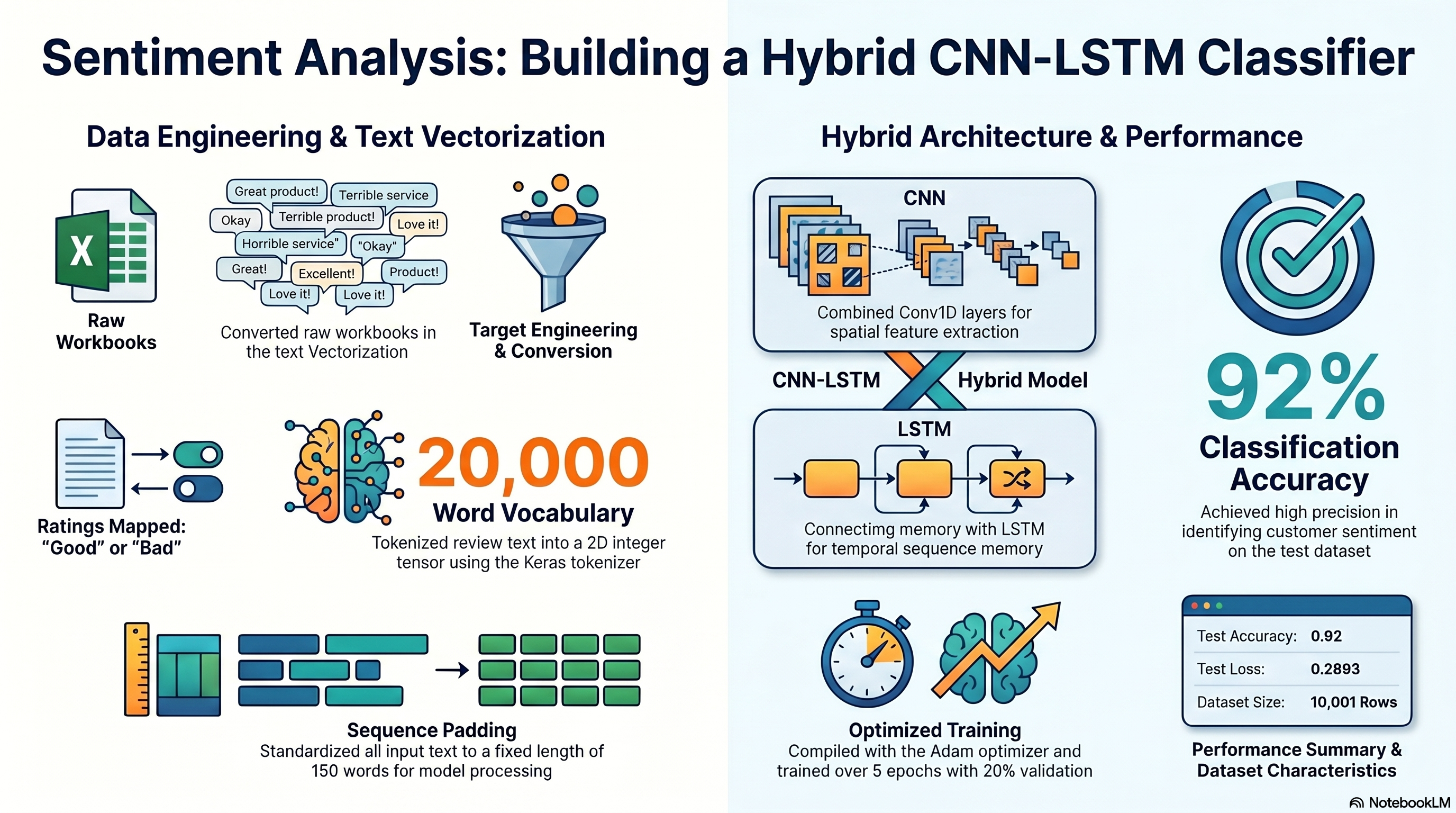
Capstone 11 Infographic
This visual summary sits alongside the detailed walkthrough so the project can be understood quickly before drilling into the notebook, metrics, and exported artifacts.
Create a feature named `target` using `reviews.rating`, where ratings higher than 3 represent a pleased customer and ratings below 4 represent a customer who does not like the product.
Each walkthrough block maps the copied PDF requirements to the executed notebook cells, exported outputs, and reviewable evidence staged with this capstone.
11a
Load The Workbook And Create The Target Column
Notebook section: Workbook load and target-engineering cells
Requirement: Load the staged review data, reconcile the workbook-versus-CSV mismatch, and create the target column from reviews.rating.
The notebook reads the staged workbook, exports a converted CSV for the site, and creates the binary target the copied PDF describes from reviews.rating.
This TensorFlow Playground embed is a concept sandbox for the representation-learning ideas that sit underneath the Session 11 sequence-model work. It does not load review text, embeddings, or the CNN-LSTM notebook; instead, it uses synthetic datasets to make hidden-layer capacity, nonlinearity, and regularization easier to understand before you return to the real text-model outputs.
What This Is
The playground is not a sequence model and does not run the actual product-review or grammar workflow from the notebook.
What it does show well is how a network transforms inputs into more separable internal representations before a final classifier makes a decision.
That is the reason it belongs on this page: it helps explain the network behavior conceptually, even though the notebook evidence still lives in the real text-model artifacts.
How To Use It
Choose a preset card above the playground based on the concept you want to see: basic separation, extra capacity, nonlinear features, or regularization.
Click the preset Load button and then press the Play button inside the playground.
Watch how the output region changes over epochs and how difficult patterns need richer internal structure to separate cleanly.
Use the presets as analogies for what the deeper review-analysis model is doing with learned features under the hood.
What To Look For
Decision Boundary Basics: expect the simplest demonstration of a network creating a usable class split.
Hidden Layers On Spiral Data: expect the best illustration of why tangled patterns need more representational depth.
ReLU On XOR: expect a compact example of feature interaction and nonlinearity.
Regularization Under Noise: expect a useful analogy for keeping the model from overfitting noisy language signals.
Preset 1
Decision Boundary Basics
Starts with a compact tanh classifier on the circle dataset so you can see how a model gradually forms a usable separation. For the review-analysis capstone, this stands in for the final classifier stage that acts on learned text features, even though the playground uses 2D synthetic points instead of token sequences.
Uses a deeper network on a harder spiral problem to illustrate why more capacity can help with tangled patterns. That is useful here as a conceptual bridge to sequence models, where the network needs richer internal representations before it can separate subtle language signals like sentiment or grammatical structure.
Shows a ReLU network solving XOR, a classic example of a problem that needs nonlinear feature combinations. That directly supports the Session 11 story: text tasks often depend on interactions between features rather than any one token or score acting alone.
Uses noisy Gaussian data with regularization to show how the model avoids overreacting to messy inputs. In the review-analysis capstone, that is the best analogy here for handling noisy language patterns, uneven phrasing, and generalization beyond memorized training examples.
Use these presets to build intuition for how a network forms richer internal features before making a final decision. They are concept support only; the graded Session 11 evidence still comes from the notebook, screenshots, exported outputs, and walkthrough content tied to the real review-analysis workflow.
Colab Notebook
This section provides the notebook preview, launch link, and project file links.
The notebook opens in Google Colab when a launch URL is configured, and the project files and outputs remain available here on the site.
This notebook is generated from the copied Capstone_Session_11.pdf directions and the staged GrammarandProductReviews.xlsx dataset.
Cell 2 Markdown
Objective
Build the required CNN-LSTM hybrid model to classify product reviews as positive or negative using the staged workbook data.
Cell 3 Markdown
Source Note
The copied PDF names GrammarandProductReviews.csv, but the staged source file is GrammarandProductReviews.xlsx. This notebook loads the workbook and exports a converted CSV artifact for the website evidence flow before training the model.
Cell 4 Code · python
from pathlib import Path
import json
import os
import sys
from urllib.parse import quote

import matplotlib.pyplot as plt
import numpy as np
import pandas as pd
import seaborn as sns
import tensorflow as tf
from IPython.display import display
from sklearn.metrics import accuracy_score
from sklearn.model_selection import train_test_split

os.environ['TF_CPP_MIN_LOG_LEVEL'] = '2'
tf.keras.utils.set_random_seed(42)

IS_COLAB = 'google.colab' in sys.modules
GITHUB_REPO_OWNER = 'FrancisBurnet'
GITHUB_REPO_NAME = 'francisburnet'
GITHUB_REPO_BRANCH = 'main'
CAPSTONE_ROOT = Path('Incremental Capstones/Deep Learning Specialization/Capstone Session 11')
WORKBOOK_FILENAME = 'GrammarandProductReviews.xlsx'


def build_github_url(relative_path: Path, media: bool = False) -> str:
    encoded_path = quote(relative_path.as_posix(), safe='/')
    if media:
        return (
            f"https://media.githubusercontent.com/media/{GITHUB_REPO_OWNER}/{GITHUB_REPO_NAME}/"
            f"{GITHUB_REPO_BRANCH}/{encoded_path}"
        )
    return (
        f"https://raw.githubusercontent.com/{GITHUB_REPO_OWNER}/{GITHUB_REPO_NAME}/"
        f"{GITHUB_REPO_BRANCH}/{encoded_path}"
    )


def resolve_capstone_dir() -> Path | None:
    current = Path.cwd().resolve()
    capstone_parts = CAPSTONE_ROOT.parts
    for candidate in [current, *current.parents]:
        if len(candidate.parts) >= len(capstone_parts) and candidate.parts[-len(capstone_parts):] == capstone_parts:
            return candidate
        nested_candidate = candidate / CAPSTONE_ROOT
        if nested_candidate.exists():
            return nested_candidate
    return None


CAPSTONE_DIR = resolve_capstone_dir()
WORKBOOK_URL = build_github_url(CAPSTONE_ROOT / WORKBOOK_FILENAME)

if CAPSTONE_DIR is not None:
    OUTPUT_ROOT = CAPSTONE_DIR
    OUTPUT_MODE = 'permanent capstone outputs'
    OUTPUT_DISPLAY = (CAPSTONE_ROOT / 'outputs').as_posix()
else:
    runtime_root = Path('/content/capstone-session-11-runtime') if IS_COLAB else Path.cwd().resolve() / 'capstone-session-11-runtime'
    OUTPUT_ROOT = runtime_root
    OUTPUT_MODE = 'runtime scratch outputs; export final artifacts back into the capstone outputs folder'
    OUTPUT_DISPLAY = 'capstone-session-11-runtime/outputs'

OUTPUTS_DIR = (OUTPUT_ROOT / 'outputs').resolve()
PLOTS_DIR = OUTPUTS_DIR / 'plots'
OUTPUTS_DIR.mkdir(parents=True, exist_ok=True)
PLOTS_DIR.mkdir(parents=True, exist_ok=True)
sns.set_theme(style='whitegrid')

print('Runtime:', 'Google Colab' if IS_COLAB else 'Notebook runtime')
print('Capstone artifact path:', CAPSTONE_ROOT.as_posix())
print('Workbook source:', WORKBOOK_URL)
print('Output mode:', OUTPUT_MODE)
print('Output target:', OUTPUT_DISPLAY)
WARNING:tensorflow:TensorFlow GPU support is not available on native Windows for TensorFlow >= 2.11. Even if CUDA/cuDNN are installed, GPU will not be used. Please use WSL2 or the TensorFlow-DirectML plugin.
X:\SIMPLILEARN\.venv\Lib\site-packages\keras\src\layers\core\embedding.py:103: UserWarning: Argument `input_length` is deprecated. Just remove it.
  warnings.warn(