Francis Burnet – AI Engineering Portfolio

Capstone portfolio spanning AI engineering, applied data science, machine learning, and deep learning.

Francis Burnet headshot

Capstone 5 Evidence Map

Capstone 5 evidence image
Capstone Summary

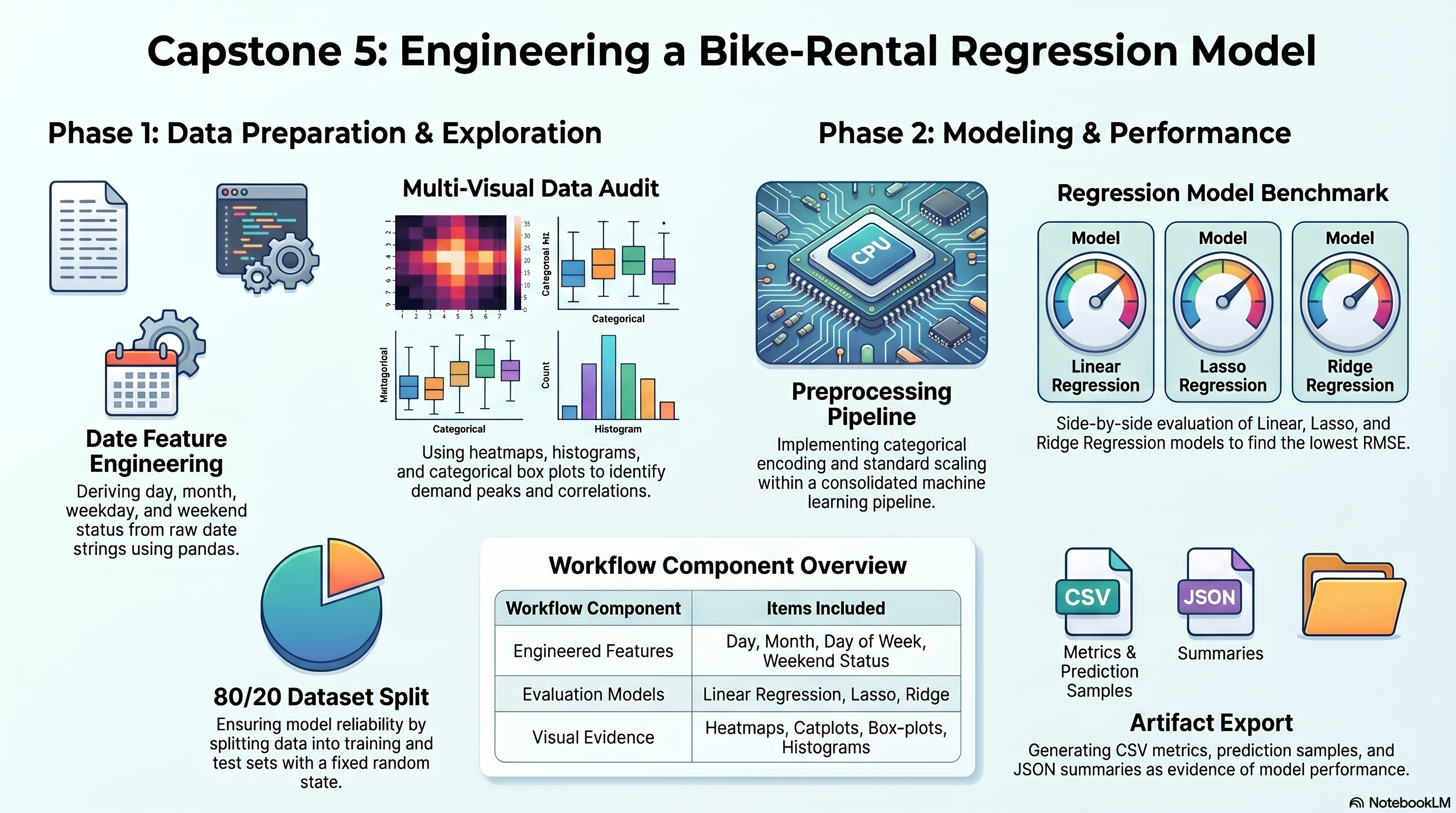
This document outlines a specific project within the Microsoft AI Engineering Program 2026, focusing on a regression analysis for bike rentals in Florida. The featured Capstone 5 serves as a practical application of machine learning, where raw data is transformed through feature engineering and meticulous data auditing. Students must generate a variety of exploratory visualizations, including heatmaps and distribution plots, to identify patterns in rental demand. The workflow evaluates the performance of Linear, Lasso, and Ridge regression models to determine the most accurate predictive results. All findings, including automated metrics and the executed code, are organized into a structured digital portfolio for professional review. By mapping specific technical requirements to tangible outputs, the source demonstrates a comprehensive approach to solving applied data science problems.

Capstone 5 Scope

Capstone 5 converts the copied bike-rental regression directions into an executed notebook with exploratory plots, encoded feature preparation, exported metrics, and prediction samples.

Primary staged dataset: FloridaBikeRentals.csv.

Notebook evidence plus CSV and JSON outputs are staged under outputs/.

Original Project PDF

The copied project directions are embedded here for direct comparison against the notebook and output artifacts.

Requirement Checklist

1a

Build a model to predict the hourly rented bike count needed for a stable supply of rental bikes using rented bike count, hour of day, temperature, humidity, wind speed, rainfall, holidays, and other provided factors.

Source mapping: Requirements file

1b

Load the dataset `FloridaBikeRentals.csv`.

Source mapping: Requirements file

1c

Check for null values in any columns.

Source mapping: Requirements file

1d

Handle the missing values.

Source mapping: Requirements file

1e

Convert the `Date` column to date format.

Source mapping: Requirements file

1f

Extract day from the date column.

Source mapping: Requirements file

1g

Extract month from the date column.

Source mapping: Requirements file

1h

Extract day of week from the date column.

Source mapping: Requirements file

1i

Extract a weekday or weekend flag from the date column.

Source mapping: Requirements file

1j

Check feature correlation using a heatmap.

Source mapping: Requirements file

1k

Plot the distribution plot of `Rented Bike Count`.

Source mapping: Requirements file

1l

Plot the histogram of all numerical features.

Source mapping: Requirements file

1m

Plot the box plot of `Rented Bike Count` against all categorical features.

Source mapping: Requirements file

1n

Plot the Seaborn catplot of `Rented Bike Count` against `Hour`, `Holiday`, `Rainfall(mm)`, `Snowfall (cm)`, weekdays, and weekend.

Source mapping: Requirements file

1o

Record the inferences from the required catplot comparisons.

Source mapping: Requirements file

1p

Encode the categorical features into numerical features.

Source mapping: Requirements file

1q

Use `get_dummies()` for categorical encoding.

Source mapping: Requirements file

1r

Identify the target variable.

Source mapping: Requirements file

1s

Split the dataset into train and test using an 80:20 ratio and random state `1`.

Source mapping: Requirements file

1t

Perform standard scaling on the training dataset.

Source mapping: Requirements file

1u

Perform Linear Regression to predict the bike count required each hour.

Source mapping: Requirements file

1v

Perform Lasso Regression to predict the bike count required each hour.

Source mapping: Requirements file

1w

Perform Ridge Regression to predict the bike count required each hour.

Source mapping: Requirements file

1x

Compare the results from Linear Regression, Lasso Regression, and Ridge Regression.

Source mapping: Requirements file

Requirement Walkthrough

Each walkthrough block maps the copied PDF requirements to the executed notebook cells, exported outputs, and reviewable evidence staged with this capstone.

5a

Load The Dataset And Build The Required Date Features

Notebook section: Load, audit, and feature-engineering cells

Requirement: Load the dataset, audit nulls, convert Date, and derive day, month, weekday, and weekend features.

The notebook loads the staged CSV with Latin-1 handling, audits missing values, and derives the calendar fields required by the copied PDF before modeling begins.

Results Capture
  • Dataset shape is [8760,18].
  • Derived fields include day, month, day_of_week, and is_weekend.
  • The null-value audit is recorded before model training.
df = pd.read_csv(DATASET_PATH, encoding='latin1')
df['Date'] = pd.to_datetime(df['Date'], dayfirst=True)
df['day'] = df['Date'].dt.day
df['month'] = df['Date'].dt.month
df['day_of_week'] = df['Date'].dt.day_name()
df['is_weekend'] = df['Date'].dt.dayofweek >= 5
5b

Produce The Required Exploratory Charts

Notebook section: Correlation, histogram, box-plot, and catplot cells

Requirement: Create the heatmap, target distribution plot, histograms, categorical box plots, and the required catplot comparisons.

The notebook exports the full exploratory plot bundle directly into outputs/plots so the site can surface the exact evidence files rather than describing them abstractly.

Results Capture
  • The plot bundle includes a correlation heatmap, target distribution plot, histograms, box plots, and feature comparison charts.
  • Catplot inference notes are exported in the summary JSON for Hour, Holiday, Rainfall, Snowfall, weekday, and weekend comparisons.
sns.heatmap(numeric_df.corr(numeric_only=True), cmap='coolwarm', center=0)
sns.histplot(df['Rented Bike Count'], kde=True)
for column in ['Seasons', 'Holiday', 'Functioning Day']:
    sns.boxplot(data=df, x=column, y='Rented Bike Count')
Associated Artifact

Correlation Heatmap

Saved heatmap for the numeric feature correlation scan.

Correlation Heatmap
Associated Artifact

Target Distribution

Saved distribution plot for the target variable.

Target Distribution
Associated Artifact

Numeric Feature Histograms

Saved histograms for the numeric feature set.

Numeric Feature Histograms
Associated Artifact

Seasons Box Plot

Saved box plot for bike rentals across seasons.

Seasons Box Plot
Associated Artifact

Holiday Box Plot

Saved box plot for bike rentals on holiday versus non-holiday days.

Holiday Box Plot
Associated Artifact

Functioning Day Box Plot

Saved box plot for bike rentals by functioning day status.

Functioning Day Box Plot
Associated Artifact

Hour Catplot

Saved catplot for mean bike rentals by hour of day.

Hour Catplot
Associated Artifact

Holiday Catplot

Saved catplot comparing rentals on holiday versus non-holiday days.

Holiday Catplot
Associated Artifact

Rainfall Catplot

Saved catplot for rentals across rainfall levels.

Rainfall Catplot
Associated Artifact

Snowfall Catplot

Saved catplot for rentals across snowfall levels.

Snowfall Catplot
Associated Artifact

Day of Week Catplot

Saved catplot for mean bike rentals by day of the week.

Day of Week Catplot
Associated Artifact

Weekend Catplot

Saved catplot comparing weekday versus weekend demand.

Weekend Catplot
Associated Artifact

Model Error Comparison

Saved comparison chart for RMSE and MAE across the three models.

Model Error Comparison
5c

Encode Features, Scale Inputs, And Compare Regression Models

Notebook section: Model-preparation and model-comparison cells

Requirement: Encode categorical features, split the data 80:20 with random_state 1, standard-scale the inputs, and compare Linear, Lasso, and Ridge Regression.

The notebook stages a get_dummies preview, then trains the three required regression models inside a scaled preprocessing pipeline and exports the comparison metrics.

Results Capture
  • Best model by RMSE: Lasso Regression.
  • Train rows: 7008; test rows: 1752.
  • Model metrics and prediction samples are exported as CSV artifacts.
X_train, X_test, y_train, y_test = train_test_split(X, y, test_size=0.2, random_state=1)
pipeline = Pipeline([('preprocessor', preprocessor), ('model', estimator)])
pipeline.fit(X_train, y_train)
predictions = pipeline.predict(X_test)
Associated Artifact

Model R\u00b2 Comparison

Saved comparison chart for R\u00b2 values across Linear, Lasso, and Ridge Regression.

Model R\u00b2 Comparison

Colab Notebook

This section provides the notebook preview, launch link, and project file links.

The notebook opens in Google Colab when a launch URL is configured, and the project files and outputs remain available here on the site.

Capstone 5 Notebook Workspace
Launch Colab
Embedded Notebook Preview
Cell 1 Markdown

Capstone Session 5

This notebook is generated from the copied Capstone_Session_5.pdf task list and the staged FloridaBikeRentals.csv dataset. It follows the same requirement-first workflow used across the FrancisBurnet capstone site.

Cell 2 Markdown

Objective

Predict hourly bike rental demand and compare Linear Regression, Lasso Regression, and Ridge Regression using the required preprocessing and exploratory analysis steps.

Cell 3 Code · python
from pathlib import Path
import json
import sys
from urllib.parse import quote

import matplotlib.pyplot as plt
import numpy as np
import pandas as pd
import seaborn as sns
from IPython.display import display
from sklearn.compose import ColumnTransformer
from sklearn.impute import SimpleImputer
from sklearn.linear_model import Lasso, LinearRegression, Ridge
from sklearn.metrics import mean_absolute_error, mean_squared_error, r2_score
from sklearn.model_selection import train_test_split
from sklearn.pipeline import Pipeline
from sklearn.preprocessing import OneHotEncoder, StandardScaler

IS_COLAB = 'google.colab' in sys.modules
GITHUB_REPO_OWNER = 'FrancisBurnet'
GITHUB_REPO_NAME = 'francisburnet'
GITHUB_REPO_BRANCH = 'main'
CAPSTONE_ROOT = Path('Incremental Capstones/Machine Learning Using Python/Capstone Session 5')
DATASET_FILENAME = 'FloridaBikeRentals.csv'


def build_raw_github_url(relative_path: Path) -> str:
    encoded_path = quote(relative_path.as_posix(), safe='/')
    return (
        f"https://raw.githubusercontent.com/{GITHUB_REPO_OWNER}/{GITHUB_REPO_NAME}/"
        f"{GITHUB_REPO_BRANCH}/{encoded_path}"
    )


def resolve_capstone_dir() -> Path | None:
    current = Path.cwd().resolve()
    capstone_parts = CAPSTONE_ROOT.parts
    for candidate in [current, *current.parents]:
        if len(candidate.parts) >= len(capstone_parts) and candidate.parts[-len(capstone_parts):] == capstone_parts:
            return candidate
        nested_candidate = candidate / CAPSTONE_ROOT
        if nested_candidate.exists():
            return nested_candidate
    return None


CAPSTONE_DIR = resolve_capstone_dir()
DATASET_URL = build_raw_github_url(CAPSTONE_ROOT / DATASET_FILENAME)

if CAPSTONE_DIR is not None:
    OUTPUT_ROOT = CAPSTONE_DIR
    OUTPUT_MODE = 'permanent capstone outputs'
    OUTPUT_DISPLAY = (CAPSTONE_ROOT / 'outputs').as_posix()
else:
    runtime_root = Path('/content/capstone-session-5-runtime') if IS_COLAB else Path.cwd().resolve() / 'capstone-session-5-runtime'
    OUTPUT_ROOT = runtime_root
    OUTPUT_MODE = 'runtime scratch outputs; export final artifacts back into the capstone outputs folder'
    OUTPUT_DISPLAY = 'capstone-session-5-runtime/outputs'

OUTPUTS_DIR = (OUTPUT_ROOT / 'outputs').resolve()
PLOTS_DIR = OUTPUTS_DIR / 'plots'
OUTPUTS_DIR.mkdir(parents=True, exist_ok=True)
PLOTS_DIR.mkdir(parents=True, exist_ok=True)
sns.set_theme(style='whitegrid')
pd.set_option('display.max_columns', 100)

print('Runtime:', 'Google Colab' if IS_COLAB else 'Notebook runtime')
print('Capstone artifact path:', CAPSTONE_ROOT.as_posix())
print('Dataset source:', DATASET_URL)
print('Output mode:', OUTPUT_MODE)
print('Output target:', OUTPUT_DISPLAY)
Output
Runtime: Local / notebook runtime
Base directory: x:\SIMPLILEARN\FrancisBurnetCom\Incremental Capstones\Machine Learning Using Python\Capstone Session 5
Dataset path: x:\SIMPLILEARN\FrancisBurnetCom\Incremental Capstones\Machine Learning Using Python\Capstone Session 5\FloridaBikeRentals.csv
Cell 4 Markdown

Load and audit the staged dataset

Cell 5 Code · python
df = pd.read_csv(DATASET_URL, encoding='latin1')
df.columns = [column.replace('�', '°').strip() for column in df.columns]
display(df.head())
print('Dataset source used:', DATASET_URL)
print('Shape:', df.shape)
print('Columns:', df.columns.tolist())
null_counts = df.isna().sum().sort_values(ascending=False)
display(null_counts[null_counts > 0])
Output
         Date  Rented Bike Count  Hour  Temperature(°C)  Humidity(%)  \
0  01/12/2017                254     0             -5.2           37   
1  01/12/2017                204     1             -5.5           38   
2  01/12/2017                173     2             -6.0           39   
3  01/12/2017                107     3             -6.2           40   
4  01/12/2017                 78     4             -6.0           36   

   Wind speed (m/s)  Visibility (10m)  Dew point temperature(°C)  \
0               2.2              2000                      -17.6   
1               0.8              2000                      -17.6   
2               1.0              2000                      -17.7   
3               0.9              2000                      -17.6   
4               2.3              2000                      -18.6   

   Solar Radiation (MJ/m2)  Rainfall(mm)  Snowfall (cm) Seasons     Holiday  \
0                      0.0           0.0            0.0  Winter  No Holiday   
1                      0.0           0.0            0.0  Winter  No Holiday   
2                      0.0           0.0            0.0  Winter  No Holiday   
3                      0.0           0.0            0.0  Winter  No Holiday   
4                      0.0           0.0            0.0  Winter  No Holiday   

  Functioning Day  
0             Yes  
1             Yes  
2             Yes  
3             Yes  
4             Yes  
Shape: (8760, 14)
Columns: ['Date', 'Rented Bike Count', 'Hour', 'Temperature(°C)', 'Humidity(%)', 'Wind speed (m/s)', 'Visibility (10m)', 'Dew point temperature(°C)', 'Solar Radiation (MJ/m2)', 'Rainfall(mm)', 'Snowfall (cm)', 'Seasons', 'Holiday', 'Functioning Day']
Series([], dtype: int64)
Cell 6 Markdown

Feature engineering from the required date column

Cell 7 Code · python
df['Date'] = pd.to_datetime(df['Date'], dayfirst=True)
df['day'] = df['Date'].dt.day
df['month'] = df['Date'].dt.month
df['day_of_week'] = df['Date'].dt.day_name()
df['is_weekend'] = df['Date'].dt.dayofweek >= 5
display(df[['Date', 'day', 'month', 'day_of_week', 'is_weekend']].head())
Output
        Date  day  month day_of_week  is_weekend
0 2017-12-01    1     12      Friday       False
1 2017-12-01    1     12      Friday       False
2 2017-12-01    1     12      Friday       False
3 2017-12-01    1     12      Friday       False
4 2017-12-01    1     12      Friday       False
Cell 8 Markdown

Required exploratory analysis plots

Cell 9 Code · python
numeric_df = df.select_dtypes(include=['number']).copy()
fig, ax = plt.subplots(figsize=(12, 8))
sns.heatmap(numeric_df.corr(numeric_only=True), cmap='coolwarm', center=0, ax=ax)
ax.set_title('Feature Correlation Heatmap')
fig.tight_layout()
fig.savefig(PLOTS_DIR / 'correlation_heatmap.png', dpi=150)
plt.show()
plt.close(fig)
Output
<Figure size 1200x800 with 2 Axes>
Cell 10 Code · python
fig, ax = plt.subplots(figsize=(10, 5))
sns.histplot(df['Rented Bike Count'], kde=True, ax=ax)
ax.set_title('Distribution of Rented Bike Count')
fig.tight_layout()
fig.savefig(PLOTS_DIR / 'rented_bike_count_distribution.png', dpi=150)
plt.show()
plt.close(fig)
Output
<Figure size 1000x500 with 1 Axes>
Cell 11 Code · python
fig = df.select_dtypes(include=['number']).hist(figsize=(16, 14), bins=30)
plt.tight_layout()
plt.savefig(PLOTS_DIR / 'numeric_feature_histograms.png', dpi=150)
plt.show()
plt.close('all')
Output
<Figure size 1600x1400 with 12 Axes>
Cell 12 Code · python
for column in ['Seasons', 'Holiday', 'Functioning Day']:
    fig, ax = plt.subplots(figsize=(10, 5))
    sns.boxplot(data=df, x=column, y='Rented Bike Count', ax=ax)
    ax.set_title(f'Rented Bike Count by {column}')
    ax.tick_params(axis='x', rotation=20)
    fig.tight_layout()
    safe_name = column.lower().replace(' ', '_')
    fig.savefig(PLOTS_DIR / f'boxplot_{safe_name}.png', dpi=150)
    plt.show()
    plt.close(fig)
Output
<Figure size 1000x500 with 1 Axes>
Cell 13 Code · python
catplot_specs = [
    ('Hour', 'hour'),
    ('Holiday', 'holiday'),
    ('Rainfall(mm)', 'rainfall'),
    ('Snowfall (cm)', 'snowfall'),
    ('day_of_week', 'day_of_week'),
    ('is_weekend', 'is_weekend'),
]
inferences = []
for column, slug in catplot_specs:
    fig, ax = plt.subplots(figsize=(12, 5))
    grouped = df.groupby(column, dropna=False)['Rented Bike Count'].mean().sort_values(ascending=False)
    sns.barplot(x=grouped.index.astype(str), y=grouped.values, ax=ax)
    ax.set_title(f'Mean Rented Bike Count by {column}')
    ax.tick_params(axis='x', rotation=30)
    fig.tight_layout()
    fig.savefig(PLOTS_DIR / f'catplot_{slug}.png', dpi=150)
    plt.show()
    plt.close(fig)
    inferences.append({
        'feature': column,
        'highest_mean_group': str(grouped.index[0]),
        'highest_mean_value': round(float(grouped.iloc[0]), 3),
        'lowest_mean_group': str(grouped.index[-1]),
        'lowest_mean_value': round(float(grouped.iloc[-1]), 3),
    })
display(pd.DataFrame(inferences))
Output
<Figure size 1200x500 with 1 Axes>
         feature highest_mean_group  highest_mean_value lowest_mean_group  \
0           Hour                 18            1502.926                 4   
1        Holiday         No Holiday             715.228           Holiday   
2   Rainfall(mm)                1.3             764.000               7.5   
3  Snowfall (cm)                0.0             732.273               7.1   
4    day_of_week             Friday             747.118            Sunday   
5     is_weekend              False             719.449              True   

   lowest_mean_value  
0            132.592  
1            499.757  
2              9.000  
3             24.000  
4            625.155  
5            667.342  
Cell 14 Markdown

Modeling

The PDF requires get_dummies(), an 80:20 split with random_state=1, standard scaling, and comparison of Linear Regression, Lasso Regression, and Ridge Regression. The PDF does not specify regularization strengths, so the notebook uses sklearn defaults for Lasso and Ridge and records that choice in the summary output.

Cell 15 Code · python
target = 'Rented Bike Count'
feature_df = df.drop(columns=['Date'])
X = feature_df.drop(columns=[target])
y = feature_df[target]
categorical_columns = X.select_dtypes(include=['object', 'bool']).columns.tolist()
numeric_columns = [column for column in X.columns if column not in categorical_columns]

preprocessor = ColumnTransformer(
    transformers=[
        ('num', StandardScaler(), numeric_columns),
        ('cat', OneHotEncoder(handle_unknown='ignore'), categorical_columns),
    ]
)

X_train, X_test, y_train, y_test = train_test_split(X, y, test_size=0.2, random_state=1)
print('Train shape:', X_train.shape, 'Test shape:', X_test.shape)
encoded_preview = pd.get_dummies(X, columns=categorical_columns, drop_first=False)
display(encoded_preview.head())
Output
Train shape: (7008, 16) Test shape: (1752, 16)
C:\Users\franc\AppData\Local\Temp\ipykernel_62656\4026604946.py:5: Pandas4Warning: For backward compatibility, 'str' dtypes are included by select_dtypes when 'object' dtype is specified. This behavior is deprecated and will be removed in a future version. Explicitly pass 'str' to `include` to select them, or to `exclude` to remove them and silence this warning.
See https://pandas.pydata.org/docs/user_guide/migration-3-strings.html#string-migration-select-dtypes for details on how to write code that works with pandas 2 and 3.
  categorical_columns = X.select_dtypes(include=['object', 'bool']).columns.tolist()
   Hour  Temperature(°C)  Humidity(%)  Wind speed (m/s)  Visibility (10m)  \
0     0             -5.2           37               2.2              2000   
1     1             -5.5           38               0.8              2000   
2     2             -6.0           39               1.0              2000   
3     3             -6.2           40               0.9              2000   
4     4             -6.0           36               2.3              2000   

   Dew point temperature(°C)  Solar Radiation (MJ/m2)  Rainfall(mm)  \
0                      -17.6                      0.0           0.0   
1                      -17.6                      0.0           0.0   
2                      -17.7                      0.0           0.0   
3                      -17.6                      0.0           0.0   
4                      -18.6                      0.0           0.0   

   Snowfall (cm)  day  month  Seasons_Autumn  Seasons_Spring  Seasons_Summer  \
0            0.0    1     12           False           False           False   
1            0.0    1     12           False           False           False   
2            0.0    1     12           False           False           False   
3            0.0    1     12           False           False           False   
4            0.0    1     12           False           False           False   

   Seasons_Winter  Holiday_Holiday  Holiday_No Holiday  Functioning Day_No  \
0            True            False                True               False   
1            True            False                True               False   
2            True            False                True               False   
3            True            False                True               False   
4            True            False                True               False   

   Functioning Day_Yes  day_of_week_Friday  day_of_week_Monday  \
0                 True                True               False   
1                 True                True               False   
2                 True                True               False   
3                 True                True               False   
4                 True                True               False   

   day_of_week_Saturday  day_of_week_Sunday  day_of_week_Thursday  \
0                 False               False                 False   
1                 False               False                 False   
2                 False               False                 False   
3                 False               False                 False   
4                 False               False                 False   

   day_of_week_Tuesday  day_of_week_Wednesday  is_weekend_False  \
0                False                  False              True   
1                False                  False              True   
2                False                  False              True   
3                False                  False              True   
4                False                  False              True   

   is_weekend_True  
0            False  
1            False  
2            False  
3            False  
4            False  
Cell 16 Code · python
models = {
    'Linear Regression': LinearRegression(),
    'Lasso Regression': Lasso(),
    'Ridge Regression': Ridge(),
}

results = []
prediction_frames = []
for name, estimator in models.items():
    pipeline = Pipeline([('preprocessor', preprocessor), ('model', estimator)])
    pipeline.fit(X_train, y_train)
    predictions = pipeline.predict(X_test)
    rmse = float(np.sqrt(mean_squared_error(y_test, predictions)))
    mae = float(mean_absolute_error(y_test, predictions))
    r2 = float(r2_score(y_test, predictions))
    results.append({'model': name, 'rmse': rmse, 'mae': mae, 'r2': r2})
    prediction_frames.append(pd.DataFrame({
        'model': name,
        'actual': y_test.reset_index(drop=True),
        'predicted': pd.Series(predictions),
    }).head(25))

results_df = pd.DataFrame(results).sort_values('rmse').reset_index(drop=True)
display(results_df)
best_model = results_df.iloc[0].to_dict()
print('Best model by RMSE:', best_model['model'])
Output
               model        rmse         mae        r2
0   Lasso Regression  430.296819  319.643529  0.551997
1   Ridge Regression  430.788278  320.336715  0.550973
2  Linear Regression  430.803271  320.359317  0.550942
Best model by RMSE: Lasso Regression
Cell 17 Code · python
fig, ax = plt.subplots(figsize=(10, 5))
results_df.plot(x='model', y=['rmse', 'mae'], kind='bar', ax=ax)
ax.set_title('Model Error Comparison')
ax.set_ylabel('Error')
fig.tight_layout()
fig.savefig(PLOTS_DIR / 'model_error_comparison.png', dpi=150)
plt.show()
plt.close(fig)

fig, ax = plt.subplots(figsize=(10, 5))
results_df.plot(x='model', y='r2', kind='bar', color='teal', ax=ax)
ax.set_title('Model R2 Comparison')
ax.set_ylabel('R2 Score')
fig.tight_layout()
fig.savefig(PLOTS_DIR / 'model_r2_comparison.png', dpi=150)
plt.show()
plt.close(fig)
Output
<Figure size 1000x500 with 1 Axes>
Cell 18 Code · python
results_df.to_csv(OUTPUTS_DIR / 'session_5_model_metrics.csv', index=False)
pd.concat(prediction_frames, ignore_index=True).to_csv(OUTPUTS_DIR / 'session_5_prediction_samples.csv', index=False)
summary = {
    'dataset_shape': list(df.shape),
    'train_rows': int(X_train.shape[0]),
    'test_rows': int(X_test.shape[0]),
    'target': target,
    'categorical_columns': categorical_columns,
    'numeric_columns': numeric_columns,
    'model_results': results,
    'best_model': best_model,
    'catplot_inferences': inferences,
    'notes': [
        'Categorical features are encoded with pd.get_dummies() preview and pipeline one-hot encoding for model training.',
        'Lasso and Ridge use sklearn default alpha values because the PDF does not specify hyperparameters.',
    ],
}
with open(OUTPUTS_DIR / 'session_5_summary.json', 'w', encoding='utf-8') as handle:
    json.dump(summary, handle, indent=2)
summary
Output
{'dataset_shape': [8760, 18],
 'train_rows': 7008,
 'test_rows': 1752,
 'target': 'Rented Bike Count',
 'categorical_columns': ['Seasons',
  'Holiday',
  'Functioning Day',
  'day_of_week',
  'is_weekend'],
 'numeric_columns': ['Hour',
  'Temperature(°C)',
  'Humidity(%)',
  'Wind speed (m/s)',
  'Visibility (10m)',
  'Dew point temperature(°C)',
  'Solar Radiation (MJ/m2)',
  'Rainfall(mm)',
  'Snowfall (cm)',
  'day',
  'month'],
 'model_results': [{'model': 'Linear Regression',
   'rmse': 430.80327132329893,
   'mae': 320.3593174193256,
   'r2': 0.5509419599562837},
  {'model': 'Lasso Regression',
   'rmse': 430.29681892846634,
   'mae': 319.64352934565517,
   'r2': 0.5519971647497581},
  {'model': 'Ridge Regression',
   'rmse': 430.78827825169327,
   'mae': 320.33671540137607,
   'r2': 0.5509732161822174}],
 'best_model': {'model': 'Lasso Regression',
  'rmse': 430.29681892846634,
  'mae': 319.64352934565517,
  'r2': 0.5519971647497581},
 'catplot_inferences': [{'feature': 'Hour',
   'highest_mean_group': '18',
   'highest_mean_value': 1502.926,
   'lowest_mean_group': '4',
   'lowest_mean_value': 132.592},
  {'feature': 'Holiday',
   'highest_mean_group': 'No Holiday',
   'highest_mean_value': 715.228,
   'lowest_mean_group': 'Holiday',
   'lowest_mean_value': 499.757},
  {'feature': 'Rainfall(mm)',
   'highest_mean_group': '1.3',
   'highest_mean_value': 764.0,
   'lowest_mean_group': '7.5',
   'lowest_mean_value': 9.0},
  {'feature': 'Snowfall (cm)',
   'highest_mean_group': '0.0',
   'highest_mean_value': 732.273,
   'lowest_mean_group': '7.1',
   'lowest_mean_value': 24.0},
  {'feature': 'day_of_week',
   'highest_mean_group': 'Friday',
   'highest_mean_value': 747.118,
   'lowest_mean_group': 'Sunday',
   'lowest_mean_value': 625.155},
  {'feature': 'is_weekend',
   'highest_mean_group': 'False',
   'highest_mean_value': 719.449,
   'lowest_mean_group': 'True',
   'lowest_mean_value': 667.342}],
 'notes': ['Categorical features are encoded with pd.get_dummies() preview and pipeline one-hot encoding for model training.',
  'Lasso and Ridge use sklearn default alpha values because the PDF does not specify hyperparameters.']}

Cell 19 Markdown

Conclusion

This notebook stages the required exploratory analysis, encoding preview, model comparison, and saved artifacts for the website workflow. The plot files and summary outputs in outputs/ are the evidence layer the custom Session 5 page can surface next.

Project Notes
  • Dataset audit and date-feature engineering.
  • Exploratory plot bundle and catplot inference notes.
  • Regression model comparison outputs.
  • Notebook plus CSV and JSON exports.
Launch Controls

Notebook Launch

Open the matching notebook in Google Colab or review the tracked notebook source in GitHub.

Project File Links
  • Notebook File: Open Notebook File
    Executed Session 5 notebook used as the main evidence source for this page.
  • Source Dataset: Open Source Dataset
    Original bike-rental dataset staged with the copied capstone files.
  • Model Metrics CSV: Open Model Metrics CSV
    Exported comparison metrics for Linear, Lasso, and Ridge Regression.
  • Summary JSON: Open Summary JSON
    Structured summary of shapes, best model, and feature-level inference notes.

Outputs And Results

Key Outputs
  • Executed notebook artifact saved as capstone_session_5.ipynb.
  • CSV exports include model metrics and prediction samples for the held-out split.
  • Plot artifacts cover correlation, distribution, histograms, box plots, and model-comparison visuals.
Key Findings
  • The current best model by RMSE is Lasso Regression.
  • The exported summary records the strongest hourly demand peak at Hour = 18.
  • The page now surfaces both the exploratory evidence and the model-comparison outputs from the copied Session 5 workflow.